
Wazuh 5.0 extends the platform beyond collecting and detecting security events toward managing and investigating them directly in the dashboard. At initMAX, we see this practical advance in Event Management — case tracking, status, priority, comments and response visibility — as one of its most important benefits. Wazuh was already a SIEM before this release; version 5 expands what analysts can do after identifying a problem. SIEM stands for Security Information and Event Management.
The most important operational change is this: Wazuh 4.x central components cannot be upgraded to 5.x in place. The transition requires a fresh installation alongside the original environment, manual transfer or recreation of compatible configuration, and a controlled move of agents. This is a migration project, not a routine package update.
Important: historical Wazuh 4.x data cannot be transferred to Wazuh 5 through the supported migration procedure. Event and finding collection in the new system starts from zero. For the 5.0.0 Beta 5 version covered here, the vendor provides no supported transfer of this data through snapshot/restore or reindex either. See the official migration limitations.
This does not itself delete old data, but historical searches require retaining the original 4.x indexer and dashboard as a separate read-only environment. Do not delete the old indices or the required 4.x environment during cutover.
Six changes that matter most to administrators and analysts
This comparison covers the Wazuh 4.x series, including 4.14.7, not just the original 4.0 release. For familiar capabilities, we distinguish genuinely new functionality from changes to implementation, configuration or workflow.
- Manage events and investigations within Wazuh. Case Management adds status, priority, descriptions and comments to findings. This basic workflow no longer requires opening a separate ticket elsewhere.
- HTTPS and trust between agents and the manager. The new transport changes configuration requirements on both sides. A server certificate is required, but peer verification must not be assumed: in Beta 5, agents without an
<ssl>configuration default tonone. A secure transition requires provisioning trust and verification, and client certificates where the selected mode requires them. - A fresh installation without historical data: data collection in 5.x starts from zero. The Beta 5 migration procedure transfers compatible configuration, not historical indexed data. Retain the original 4.x indexer and dashboard for historical searches and build 5.x alongside them.
- Rewrite and retest custom detection content. XML decoders and rules cannot be migrated just by renaming files. Syntax, normalized fields and workflow change: YAML decoders, Sigma-compatible rules and separate Draft → Test → Custom spaces. Validate parsing as well as positive and negative detection scenarios.
- Scheduled reporting in a new reporting layer. Schedules and notifications help deliver results, but a report link is not a ready-made PDF email attachment. PDF/CSV export itself is not new in 5.x; the reporting workflow and its configuration change. For Beta 5, the vendor also documents a missing-footer issue in generated PDFs.
- A manager runs in cluster mode even with one node. This unifies the default deployment model. We have long used this approach at initMAX, although a single node alone does not provide high availability.
Wazuh 5.0 is approaching release. This article covers version 5.0.0 Beta 5. The final release may introduce further changes. This is not a recommendation to deploy the beta in production.
We can help you plan deployment and migration, from architecture to verification of custom rules. We are also preparing practical demonstrations for our Wazuh webinars.
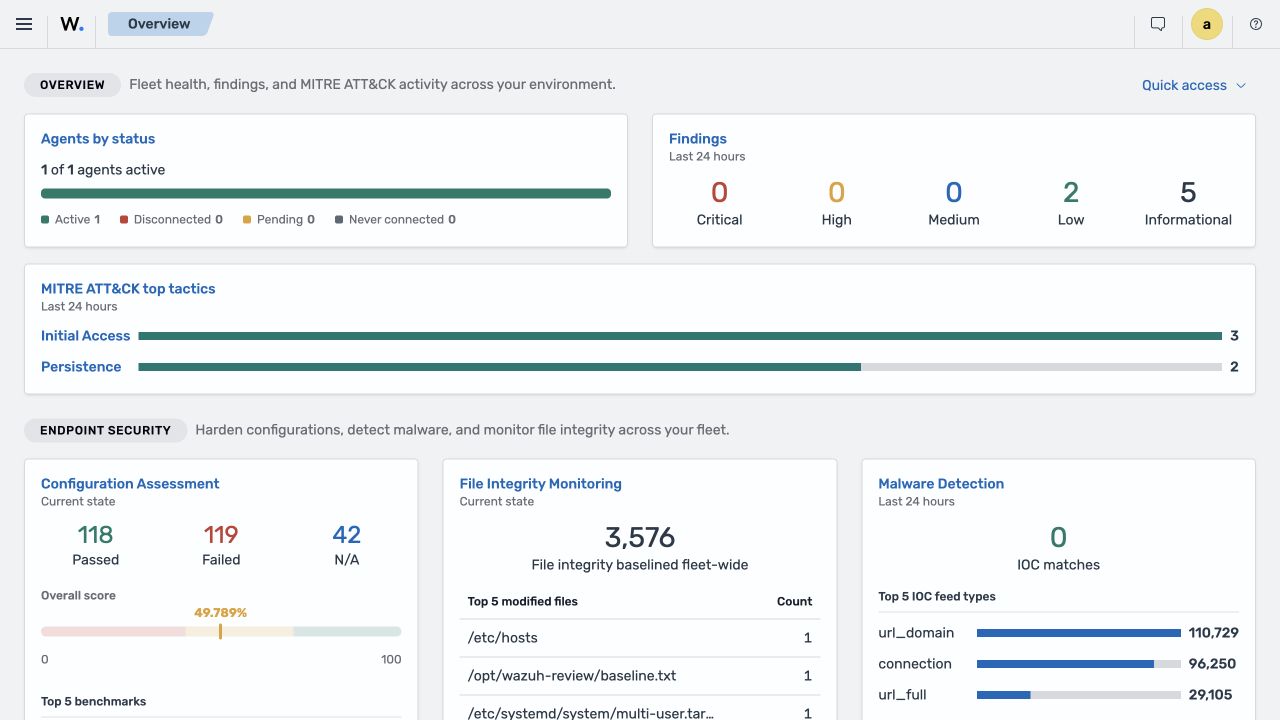
Why Wazuh 5.0 is a new generation
In the main Wazuh 4.x alert pipeline, the manager receives agent data, decodes it, evaluates rules and writes alerts. Filebeat reads the alert file and forwards documents to the indexer for the dashboard. Not all 4.x data travels through Filebeat: the indexer connector already handles state data such as vulnerabilities and newer inventory datasets. Version 5 fundamentally changes the security-event path and where detection rules are evaluated.
Wazuh 5.0 divides the work into two analytical layers:
- The normalization engine in the manager receives raw events, selects integrations and decoders, parses the input, maps it to Wazuh Common Schema, and can add GeoIP, ASN, and IOC context.
- The detection engine in the indexer evaluates normalized documents using Sigma-compatible rules and detectors. Matches produce findings, the successor to 4.x alerts in the new architecture.
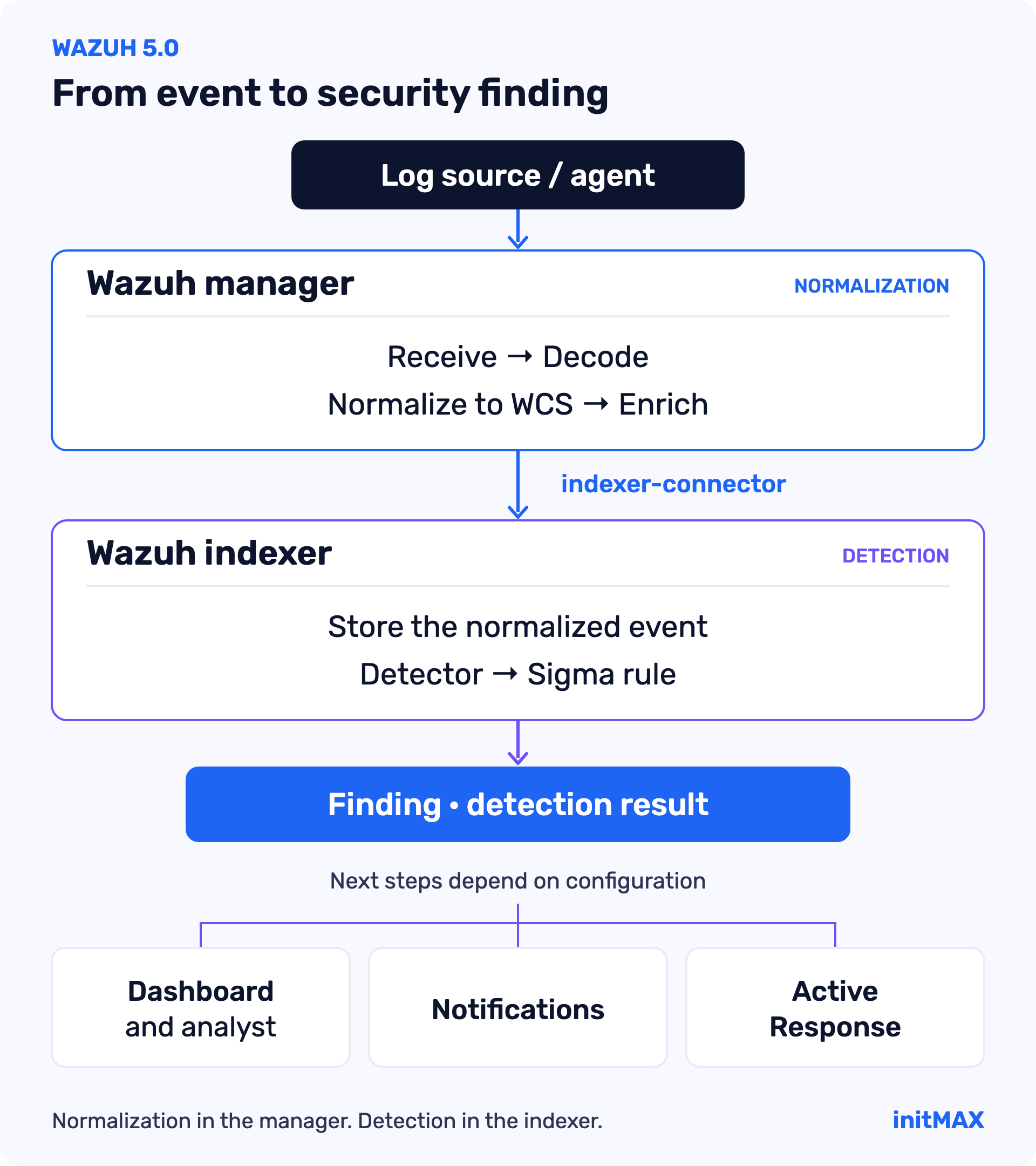
This is more than an internal refactor. It affects rule formats, index names, field names, operating metrics, retention, dashboards, and incident response. A script reading alerts.json, a dashboard using wazuh-alerts-*, or automation depending on numeric rule.level values will need review and modification.
An event is not a finding
An event records what happened. A finding records a rule match. An event may be processed by multiple active policies and match multiple detection rules, so event and finding counts need not be equal.
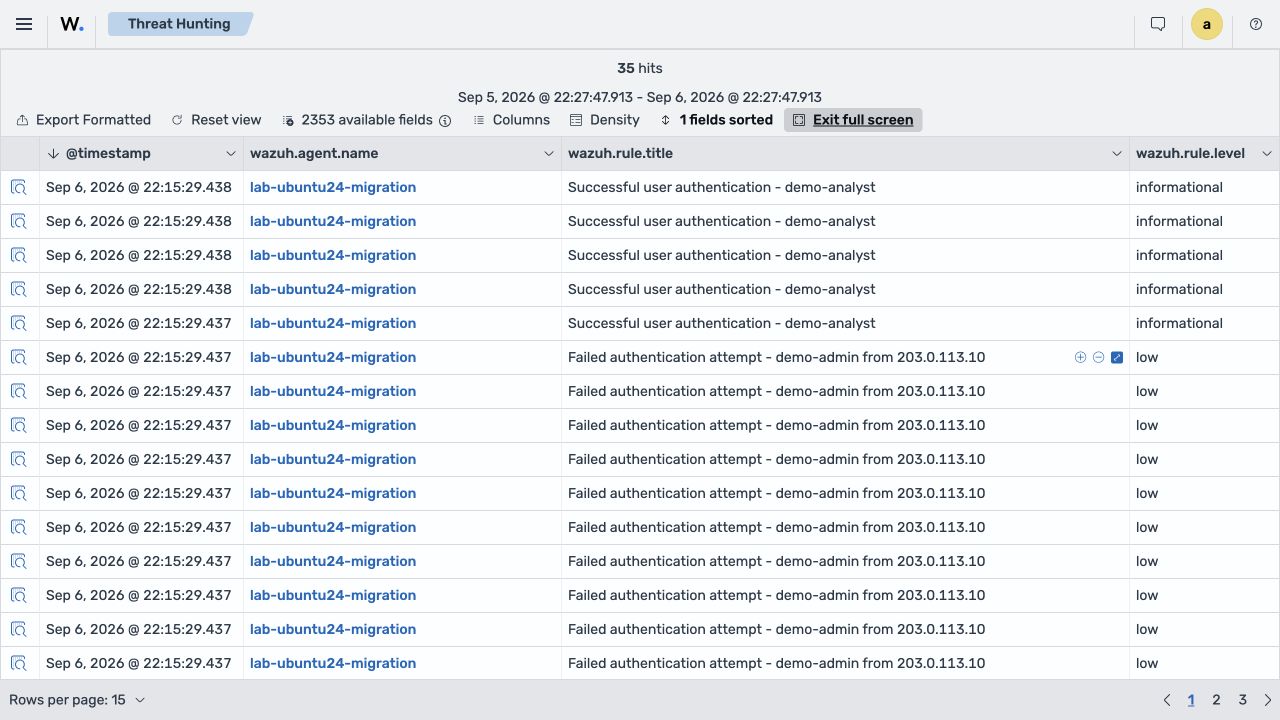
Analysts can search the normalized event stream separately from security findings. A finding includes the source event, rule metadata, severity, MITRE ATT&CK and compliance mappings, and optionally case metadata. A query against wazuh-events* therefore answers a different question from a query against wazuh-findings*.
Operational implications
- Collection and detection have a clearer boundary.
- Rules consume a normalized schema instead of inconsistent product-specific fields.
- Integrations, decoders, and rules become managed content with a controlled lifecycle.
- Indexer capacity affects not only searches but also detection latency.
- Migration testing must cover the entire pipeline, not just agent connectivity.
Wazuh 5.0 is not simply a package upgrade. Contact us to assess how it affects your custom decoders, rules, integrations, retention, and automation. We can prepare a dependency inventory and realistic migration plan before production changes begin.
Filebeat is replaced by the native indexer connector
The default data path no longer relies on a separate Filebeat process reading JSON alerts. Wazuh 5.0 sends normalized events from the manager directly to the appropriate indexer data streams through indexer-connector.
This removes the shipper layer, its filebeat.yml, modules, and file-reading queue. According to the 5.x documentation, the manager no longer stores endpoint alerts locally in the same way. Consequently, old troubleshooting procedures centered on alerts.json and the Filebeat registry are insufficient.
Technical note: Filebeat in C++? The comparison is useful for the data-shipping role: Filebeat is written in Go, while the native indexer-connector is a C++ library. Both handle Bulk API batches, queues, timed flushing and per-item items responses. On HTTP 413, the connector splits a batch or reduces its size limit depending on the mode; transient failures use retries with backoff. This does not establish a rewrite or reuse of Filebeat code, or equivalent delivery guarantees. The connector already existed in Wazuh 4.x. The 5.x change is its expanded role and the removal of standalone Filebeat from the main event path. See the connector implementation and documentation, the Beats Go Bulk API client and the Wazuh 4.14.7 connector.
Check the following instead:
- Reachability of the indexer nodes from the manager.
- TLS certificates and the connector account's permissions.
- Connector logs, including the calling module's context.
- Manager queues and watermarks.
- Indexing errors, mapping conflicts, and data-stream health.
- Communication and normalization metrics in the dashboard.
Beta 5 defines the wazuh-manager service account with the restricted wazuh_manager role for manager-to-indexer communication. During migration, check the account stored in the manager keystore and its effective permissions for the new data streams. Do not mechanically carry administrator credentials from an old configuration into routine ingestion.
The source defaults include an event queue of 131,072 slots and 32 MB, a 64 MB indexer-connector queue, 8 MB bulk batches, and a 20-second flush interval. The orchestrator measures both item and byte occupancy, counts dropped input, and warns after ten minutes of sustained contention above 90%. These are source fallbacks, not universal sizing recommendations; package configuration may override them. Monitor queue utilization, dropped events, and one-, five-, and thirty-minute EPS.
What happens to custom outputs?
Removing Filebeat does not prohibit integration with other analytics platforms. It does mean that custom Filebeat pipelines, Logstash configurations, copies of alerts.json, and external archives need an explicitly designed replacement.
Separate three requirements:
- New Wazuh 5.0 operational data written to the new data streams.
- Historical 4.x data kept searchable in the original 4.x environment as a separate archive.
- External exports to archives, data lakes, or another SIEM, with their own supported data path.
Wazuh Engine and Security Analytics
The new architecture divides work across components. Wazuh Engine in the manager normalizes and enriches events; Security Analytics in the indexer evaluates detection rules. Content Manager manages their content. This is neither one engine moved elsewhere nor a simple rewrite of analysisd. The dashboard brings normalization and detection management together under Security Analytics.
The content model includes:
- Integration: related content for a product or log source.
- Decoder: recognition, parsing, and WCS field mapping.
- Rule: detection conditions in Sigma-compatible YAML.
- Detector: rule selection, target index or alias, and execution schedule.
- KVDB: key-value lists and lookups for normalization and enrichment.
- Filter: selection of events allowed into subsequent pipeline stages.
- Policy: the order and behavior of processing stages.
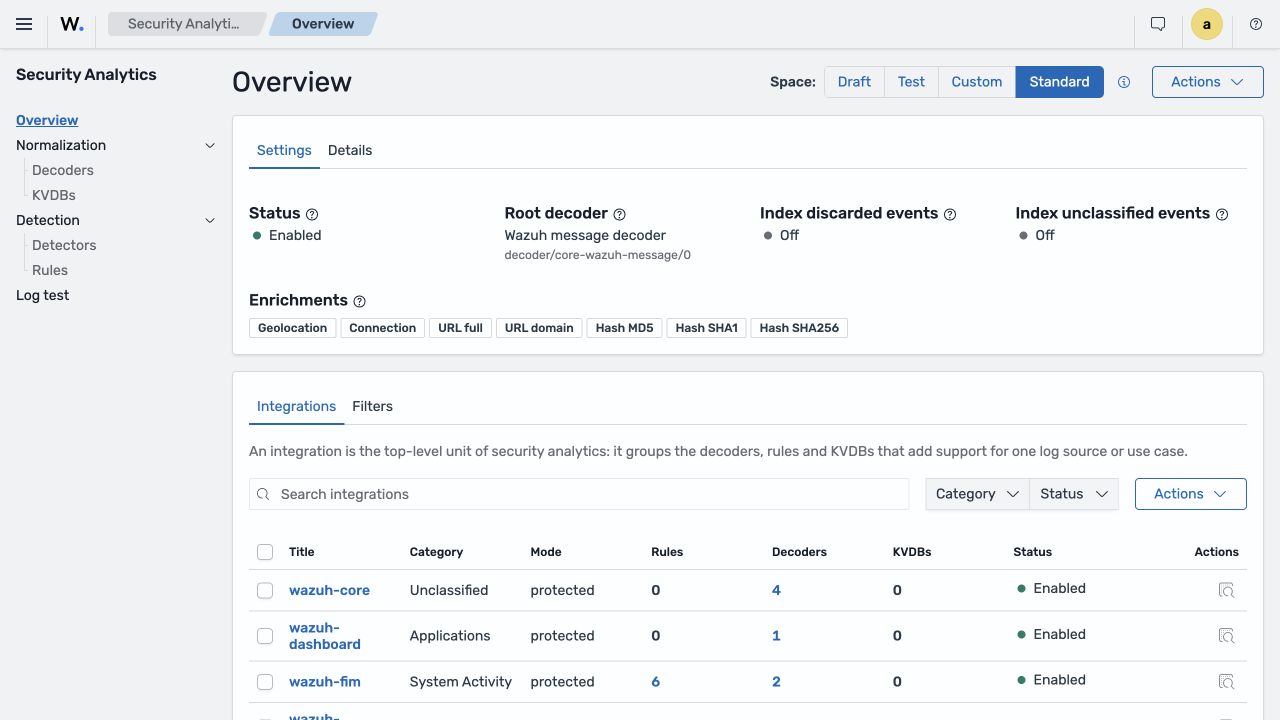
Content Manager: standard and custom content
The indexer's Content Manager plugin maintains rules, decoders, integrations, KVDBs, filters, and IOC content. It retrieves standard content from Wazuh CTI, provides APIs for custom content, and synchronizes changes with the manager's normalization engine.
Separating custom content from vendor rules is not new. Version 4.x already provides etc/rules and etc/decoders separately from the supplied ruleset, so correctly stored customizations need not be overwritten during upgrades. The 5.0 change is Content Manager and an explicit Draft → Test → Custom lifecycle: prepare the new content format, validate its dependencies and control activation instead of editing production XML files directly.
The current design periodically checks for content updates and supports manual updates. The indexer installation also includes ruleset, vulnerability, and IOC snapshots, providing initial content without requiring an immediate external connection.
What an update actually does
Content Manager synchronization defaults to 120 seconds; IOC and GeoIP checks default to 360 seconds. The manager compares the remote policy's SHA-256 hash with the deployed version and avoids reloading unchanged content.
Changed content is downloaded into a temporary namespace and validated before an atomic switch of the active route. The implementation contains rollback paths for failed imports and hot swaps. It also avoids downloading while the remote consumer is busy, preventing a snapshot of a partly updated dataset.
Content can become active without restarting the whole manager, but activation is not necessarily immediate. Hot reload itself is not new in 5.0: analysisd gained it for rules, decoders and CDB lists in Wazuh 4.13. What changes in 5.0 is content management and distribution through Content Manager, validation in separate spaces and switching the normalization engine’s policies. Check the policy hash, consumer state, last successful synchronization and active namespace—not just whether a rule is visible in the dashboard.
Four spaces: Draft, Test, Custom, and Standard
| Space | Purpose |
|---|---|
| Draft | Create, edit, and delete work-in-progress custom content. |
| Test | Validate content, run Log Test, and check dependencies before activation. |
| Custom | Active organization-specific content used by the production pipeline. |
| Standard | Read-only content supplied through Wazuh CTI. |
The custom-content workflow is Draft → Test → Custom. Content Manager processes the changes and updates the target space. Verify that normalization content is ready in the engine: a change appearing in a list is not the same as completed distribution and activation. A separately configured detector handles continuous detection against indexed events. Standard and custom policies remain separate.
This provides more control than editing XML directly on a production manager, but it does not replace Git, peer review, or regression tests. Keep YAML content versioned, associate changes with sample logs, and verify positive and negative cases before promotion.
Integrations determine ownership and routing
An integration is the top-level container for related decoders, rules, and supporting content. Each decoder belongs to one integration. The integration's category affects the destination stream:
access-management: authentication, authorization, identity, and access.applications: web servers, databases, middleware, and applications.cloud-services: AWS, Azure, GCP, and other cloud services.network-activity: firewalls, proxies, DNS, and network flows.security: EDR, SIEM feeds, scanners, and security tools.system-activity: operating systems, audit, and syslog.other: events outside those categories.unclassified: events accepted by the root decoder but not classified by a specific decoder.
The category is recorded in wazuh.integration.category and affects routing, for example to wazuh-events-v5-cloud-services. An incorrect category can affect detectors, dashboards, retention, and permissions—not just a label in a list.
Decoders move from XML to YAML and WCS
Where 4.x commonly uses XML decoder files on the manager, 5.0 uses YAML assets and a small domain-specific language. Its main sections are check to select input, parse to extract structured or text data, and normalize to map the result into WCS.
An SSH example shows why changing the file extension is not enough. The standard decoder/system-auth/0 consumes parsed syslog data and sets the normalized action. This excerpt comes from its normalization section; it is not a complete importable decoder:
normalize:
  - check: $_system.auth.ssh.event == Invalid OR $_system.auth.ssh.event == Failed OR $_system.auth.ssh.event == failures OR $_system.auth.ssh.event == fatal OR $_system.auth.ssh.event == exceeded OR $_system.auth.ssh.event == Disconnecting
    map:
      - event.action: authentication-failure
      - event.category: array_append(authentication)
      - event.outcome: failure
      - event.type: array_append(info)
The test message Failed password for invalid user demo-admin from 203.0.113.10 port 51234 ssh2 produced event.action: authentication-failure, event.outcome: failure, user.name: demo-admin, and source.ip: 203.0.113.10. Standard detection rules use those normalized fields. Temporary fields such as _system.auth.ssh.event support decoding and are not part of the public output schema.
For each custom decoder, establish its accepted input, integration and category, WCS field equivalents, data retained only in event.original, required GeoIP/IOC enrichment, and dependencies in existing rules and dashboards.
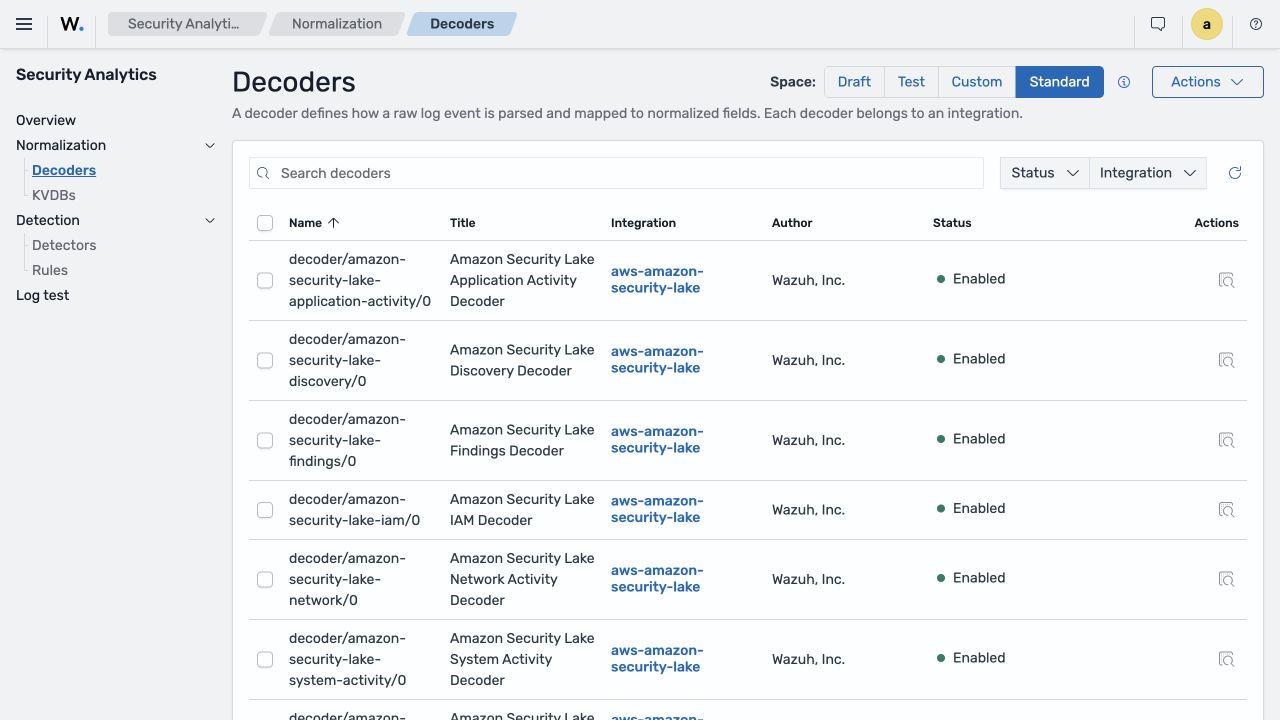
Log Test covers normalization and detection
The new Log Test follows the actual processing stages. It shows which decoders accepted or rejected an input and the normalized document, then lets you inspect rule matching. Test, Custom, and Standard content can be checked, including its interaction with already active content.
Do not stop at one matching example. Maintain valid input for important format variants, unrelated input that must be rejected, missing fields and boundary values, expected normalized JSON, expected rule/severity results, and regression samples for previous false positives and false negatives.
Custom decoder and rule: from a text log to a finding
A simple application login demonstrates the complete workflow. Wazuh 4.x already supported custom decoders and rules. Version 5 changes their syntax, normalized fields, and the Draft, Test, and Custom content lifecycle; a separate detector connects continuous detection to the data source. The following example uses the 5.0.0 Beta 5 interface.
We use two messages with the same format: a failed login and a successful login. Both should remain searchable as events, but only result=failure should produce a finding. A single failed login is not proof of an attack and does not constitute brute-force detection.
Sep 10 12:00:00 app01 initmax-auth: user=alice src=192.0.2.10 result=failure
Sep 10 12:00:00 app01 initmax-auth: user=alice src=192.0.2.10 result=success
Create the integration and decoder in Draft
In Security Analytics → Overview, select Draft and create an integration from the Integrations list. Set its title to initmax-auth-demo, its category to access-management, enter an author, and leave it enabled. In Normalization → Decoders, create a decoder assigned to that integration and enter this definition:
name: decoder/initmax-auth/0
enabled: true
metadata:
  title: initMAX authentication decoder
  author: initMAX
  description: Parses the user, source IP and result from an example application log.
  references: []
check:
  - event.original: contains(initmax-auth:)
parse|event.original:
  - '<_tmp.header> initmax-auth: user=<user.name> src=<source.ip> result=<event.outcome>'
normalize:
  - map:
      - '@timestamp': get_date()
      - event.kind: event
      - event.category: [authentication]
      - event.action: user-login
check selects messages containing initmax-auth:. The parse|event.original block uses a Logpar parsing pattern with named fields — not a regular expression copied from an old XML decoder. It produces user.name, source.ip, and event.outcome. Normalization adds event.action: user-login and the authentication category. The temporary _tmp.header field is removed from the output document.
This example deliberately assumes a fixed field order. get_date() sets processing time, not the timestamp in the syslog header. For a real application, add timestamp parsing and support its input variations; this short decoder is not a universal authentication-log parser.
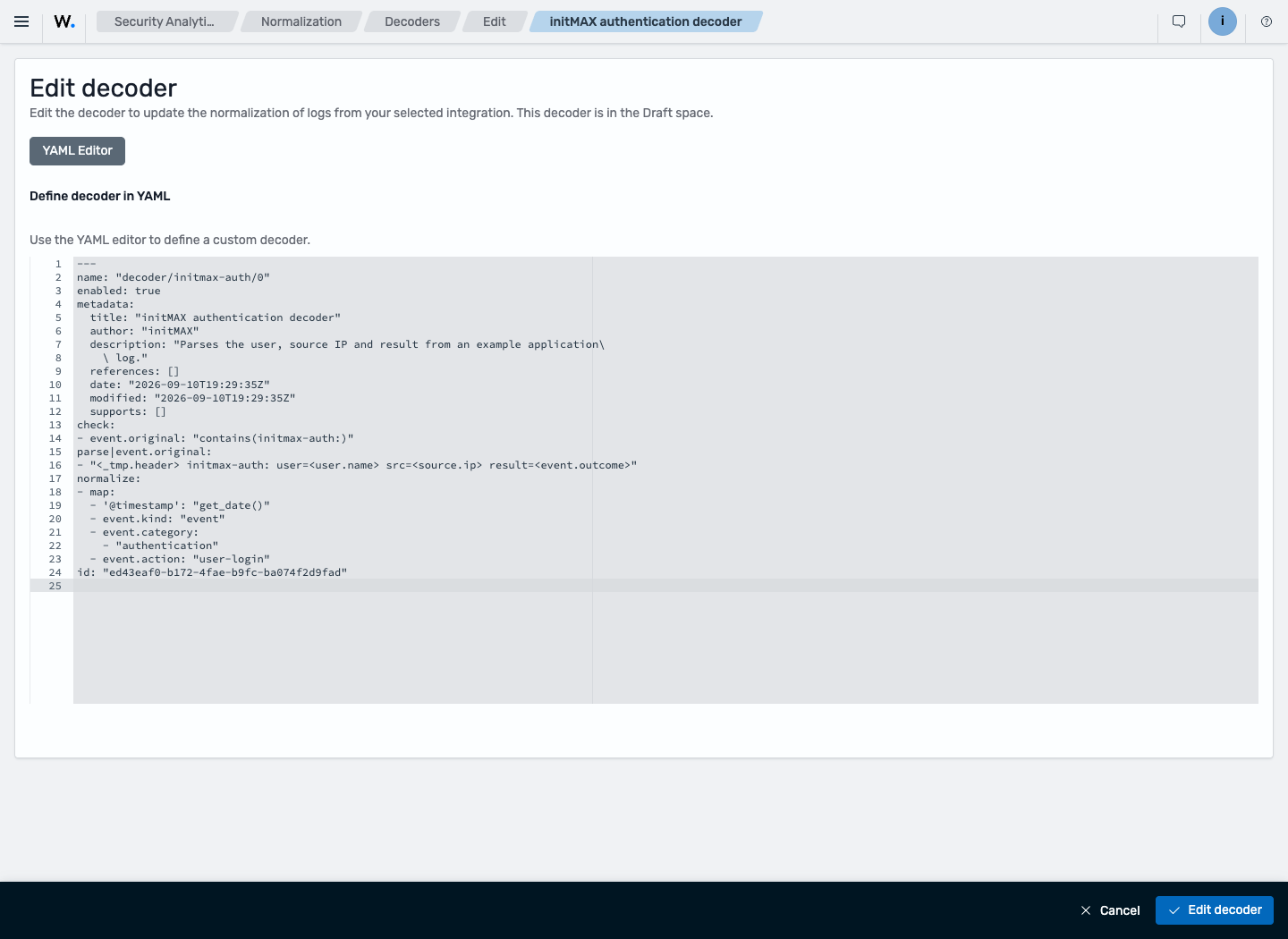
In Overview → Draft → Actions → Edit, enable the space policy and configure its root decoder. This standalone example uses decoder/initmax-auth/0 as the Root Decoder. Do not replace an existing installation’s root policy with this example: the setting affects the space, not just one integration. Incorporate new decoders into the existing tree and inspect all pending changes before promotion.
Define a rule over normalized fields
In Security Analytics → Detection → Rules, keep Draft selected, create a rule, choose initmax-auth-demo, and switch to the YAML editor. The definition below excludes automatically managed identifiers and creation dates, which differ between installations and are not detection conditions. If the editor includes an id field, retain your own rule’s identifier.
enabled: true
status: experimental
metadata:
  title: initMAX application login failure
  author: initMAX
  description: Detects a failed login to the example application. A single failure is not proof of an attack.
  references: []
logsource:
  product: initmax-auth-demo
detection:
  selection:
    event.action: user-login
    event.outcome: failure
  condition: selection
level: low
The rule does not search the original result=failure string. It matches the fields produced by the decoder: both user-login and failure must be present. The low severity reflects a simple finding that may be an ordinary user mistake. There is no repeated-attempt counter or time window in this rule.
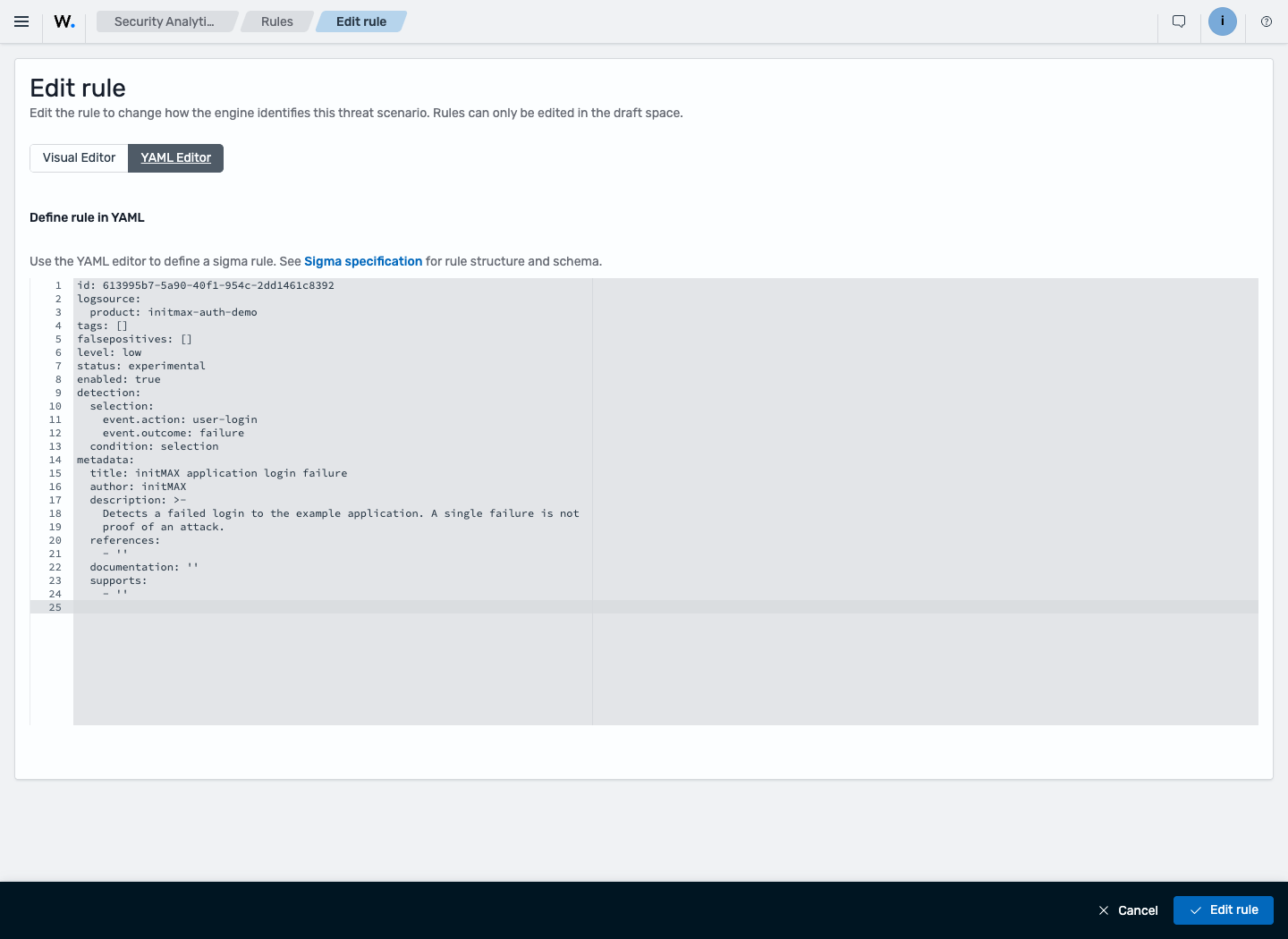
Promote to Test and check positive and negative inputs
In Overview, open Actions → Promote for Draft, inspect the complete change list, and confirm promotion to Test. In Log Test, select Test and initmax-auth-demo. Submit one message at a time and inspect both normalization and detection:
result=failure: the fields are parsed and one rule matches — initMAX application login failure.result=success: the fields are parsed, but the custom rule does not match.- A different application name: the custom decoder rejects the message.
src=not-an-ip: parsing fails and there is no matching finding. A successful API response alone does not prove successful normalization.
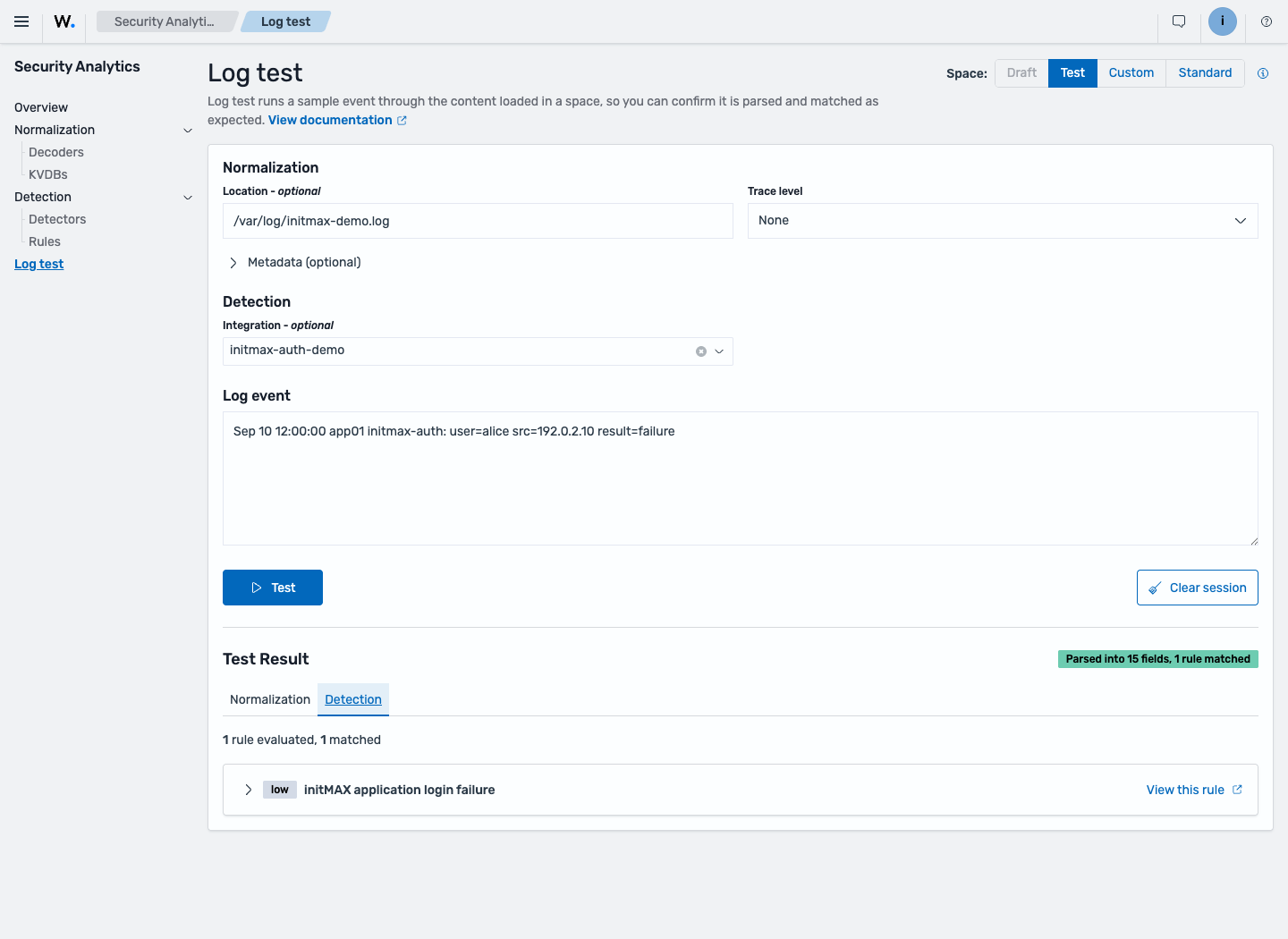
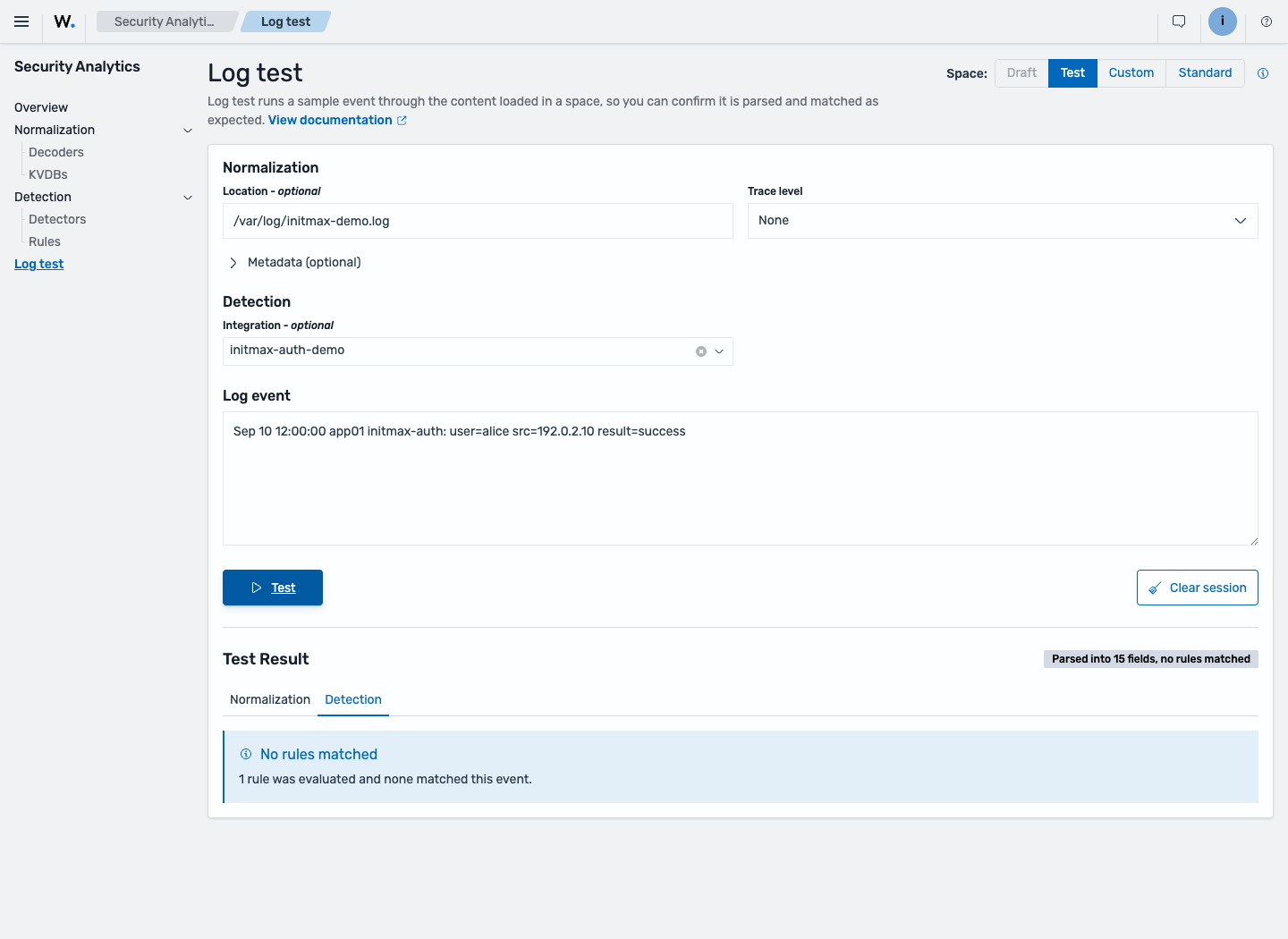
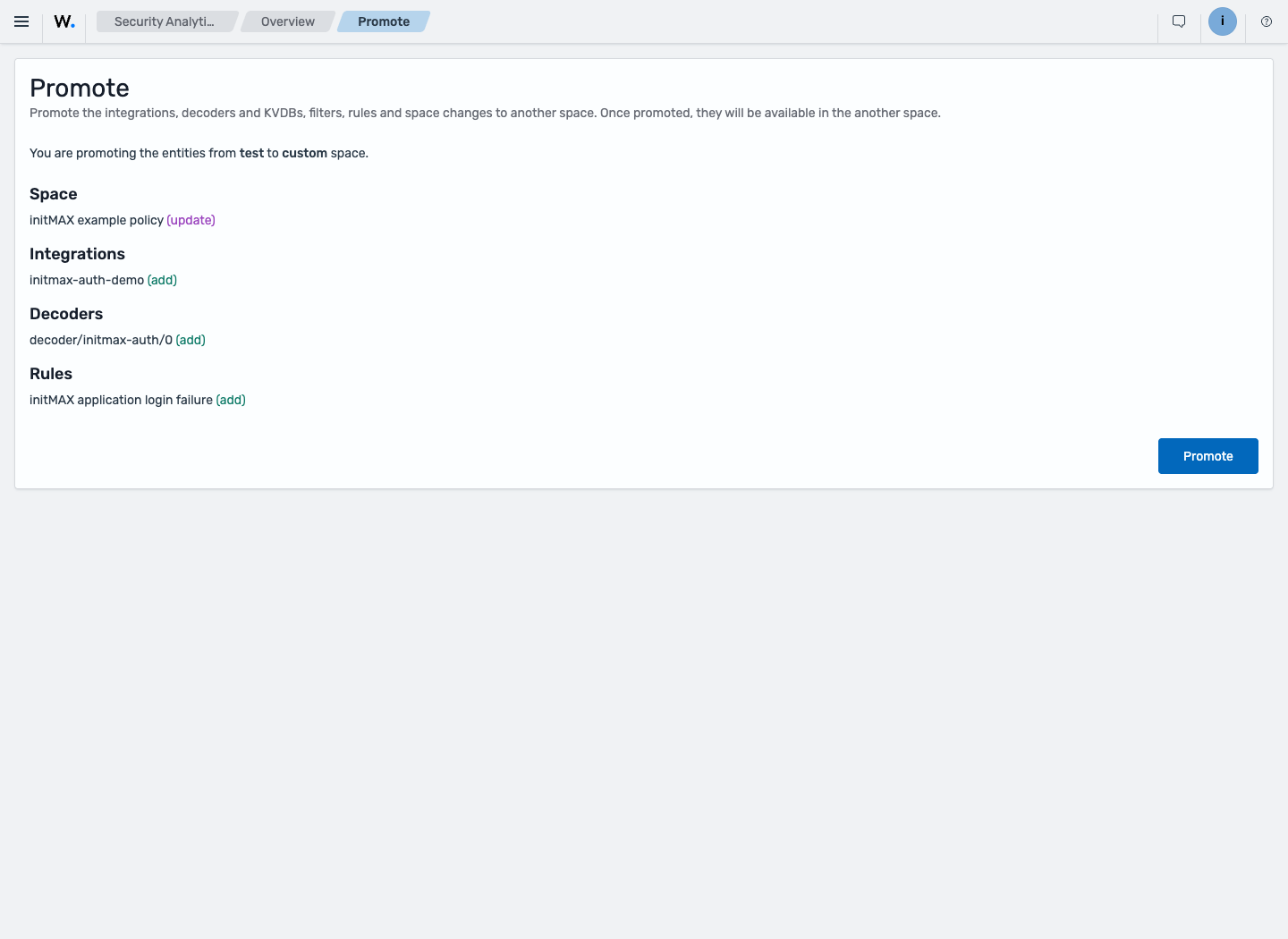
After validation, promote the changes from Test to Custom. The preview should contain only the intended policy, integration, decoder, and rule. Allow the custom content to become active, then repeat the positive and negative Log Tests in Custom. A Log Test result alone does not prove continuous detection against agent data.
Activate a detector and collect logs from an agent
In Security Analytics → Detection → Detectors → Create detector, use these settings:
- Name: initMAX authentication demo.
- Data source:
wazuh-events-v5-access-management, matching the integration category. - Space / Integration: Custom /
initmax-auth-demo. - Selected rules: initMAX application login failure only.
- Run every: 1 minute. This example configures neither notifications nor Active Response.
After creation, check the Active status and active rule list. The agent also needs normal application-log collection. For this example’s file, the following block belongs inside ossec_config in the local ossec.conf, or in the appropriate shared group configuration when centrally managed. The file must exist and be readable by the collector. Creating a decoder does not require replacing the agent’s entire configuration.
<localfile>
  <log_format>syslog</log_format>
  <location>/var/log/initmax-demo.log</location>
</localfile>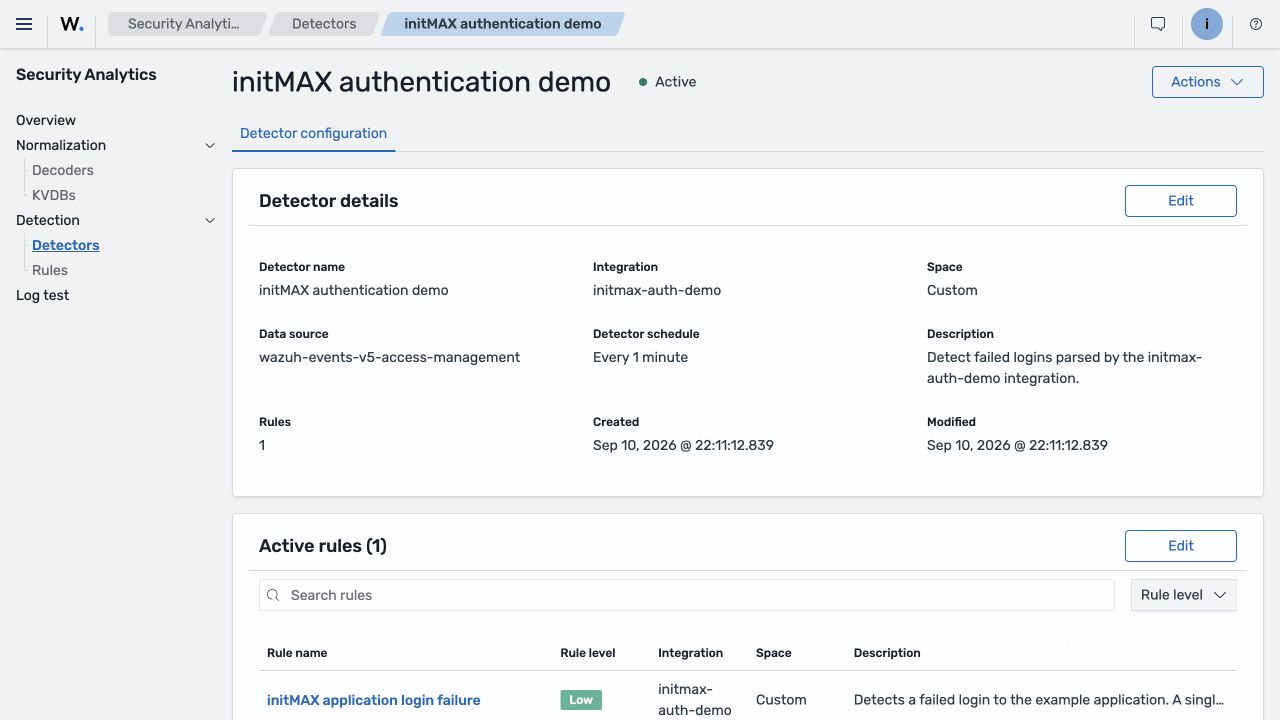
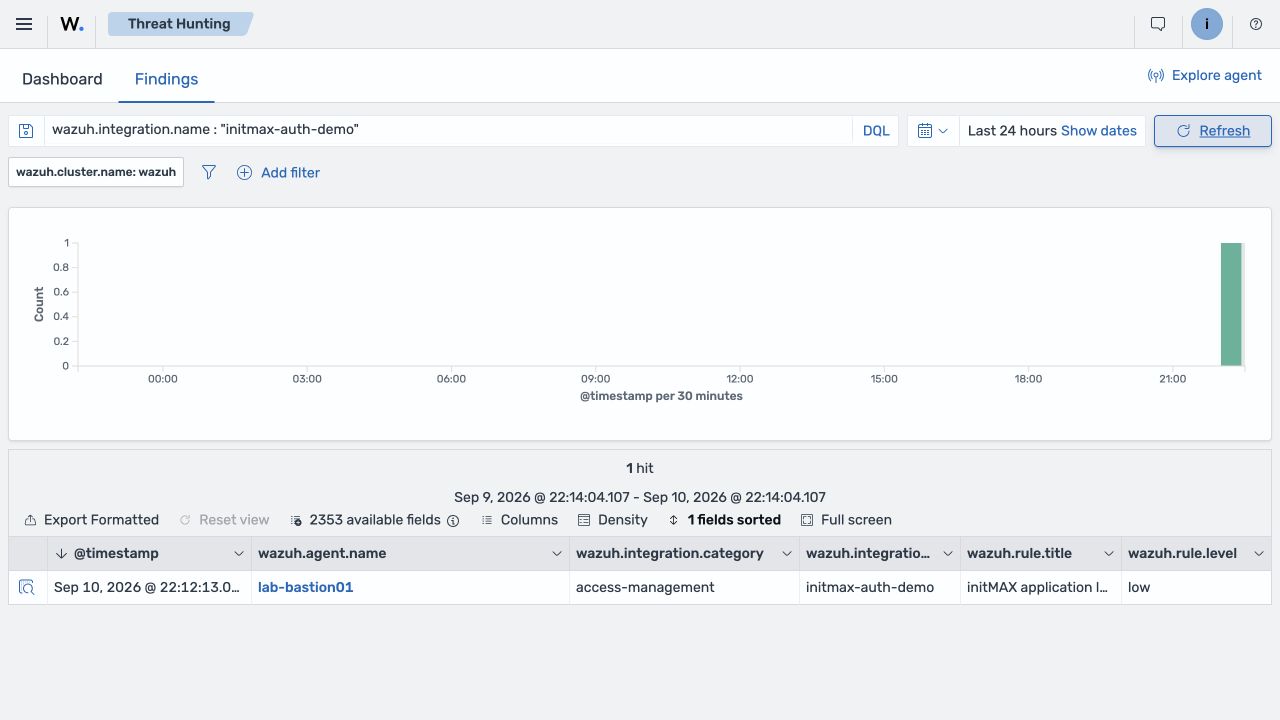
Have the application append new failure and success messages to the monitored file. The detector evaluates them on its schedule, so a finding is not synchronous with log transmission. This example produced two indexed events and one finding for the failed login. The finding links to the original document through event.index and event.doc_id, retaining the agent identity and event.original. The successful login has no custom finding.
In Threat Hunting → Findings, filter with wazuh.integration.name : "initmax-auth-demo". To check the successful message, inspect the event stream as well as Findings. This completes the chain: log collection → custom decoder → WCS event → scheduled detector → finding.
For the individual controls, see the Beta 5 documentation on normalization and spaces and rules and detectors.
Wazuh Common Schema: a common language for security data
WCS provides a shared data model based on ECS; the 5.0 work targets ECS 9.1.0. The same information should have the same field name and type whether it comes from Windows Event Log, a firewall, a cloud service, or a custom application.
A source address should not be srcip in one integration, source_address in another, and client.ip in a third. Mapping it consistently to source.ip makes rules, visualizations, and enrichment reusable across sources.
WCS also covers events, processes, files, users, hosts, cloud, DNS, registry data, vulnerabilities, compliance, and Wazuh metadata. event.original is intended to retain the original log. Preservation depends on the decoder and subsequent transformations; it is not an unconditional archive guarantee. The distinction between normal processing, raw collection and discard_events() is explained below.
Field changes affect queries and dashboards
Wazuh metadata moves under wazuh.*. The migration documentation lists these examples:
| Wazuh 4.x | Wazuh 5.x |
|---|---|
rule.level |
wazuh.rule.level |
rule.description |
wazuh.rule.title |
rule.id |
wazuh.rule.id |
agent.name |
wazuh.agent.name |
agent.id |
wazuh.agent.id |
There is no universal replacement for rule.groups: depending on the filter’s purpose, use wazuh.integration.name or other WCS metadata. Severity also changes type, from a number in the 0–16 range to informational, low, medium, high, or critical.
Consequently, rule.level >= 10 has no direct numeric equivalent. Rewrite severity filters, alert conditions, mappings, and visualizations according to the new model.
Data streams by category and purpose
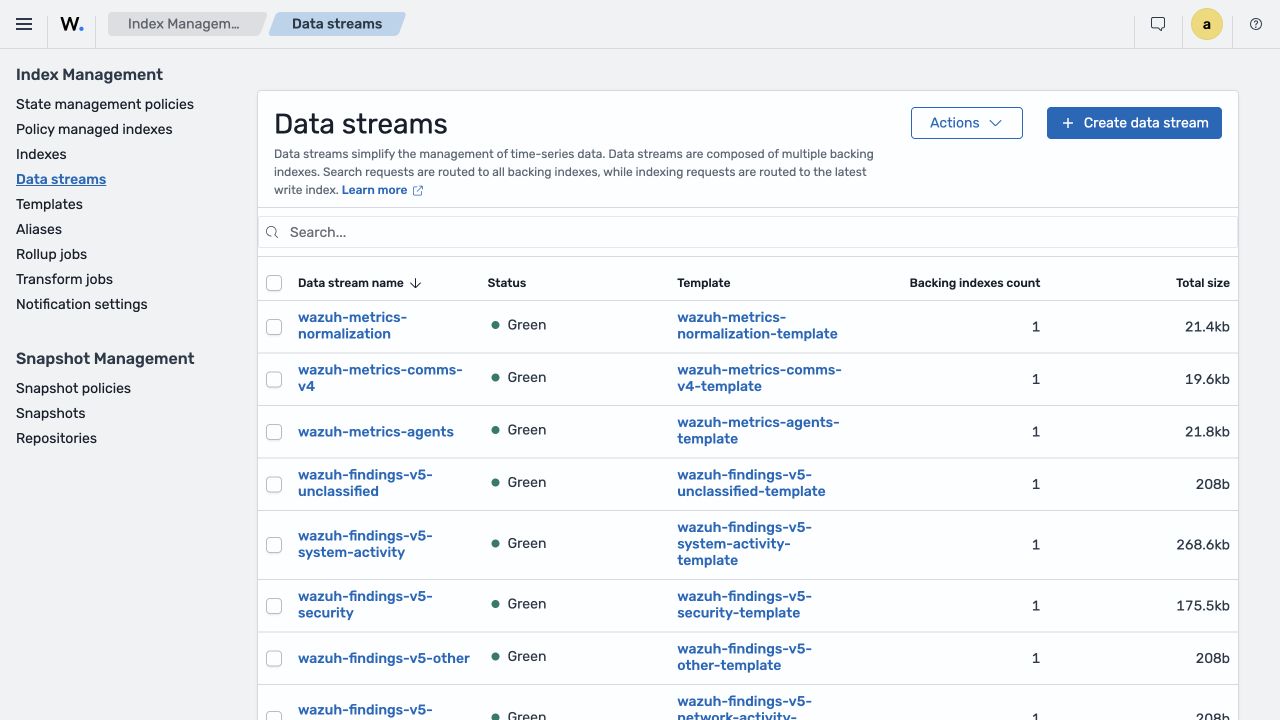
The main stream families include:
wazuh-events-v5-{category}for normalized events.wazuh-findings-v5-{category}for detection findings.wazuh-events-raw-v5for optional raw-event indexing.wazuh-active-responsesfor response requests.wazuh-metrics-*for agent, communication, and normalization telemetry.wazuh-states-*for inventory, SCA, FIM, vulnerabilities, and other state data.
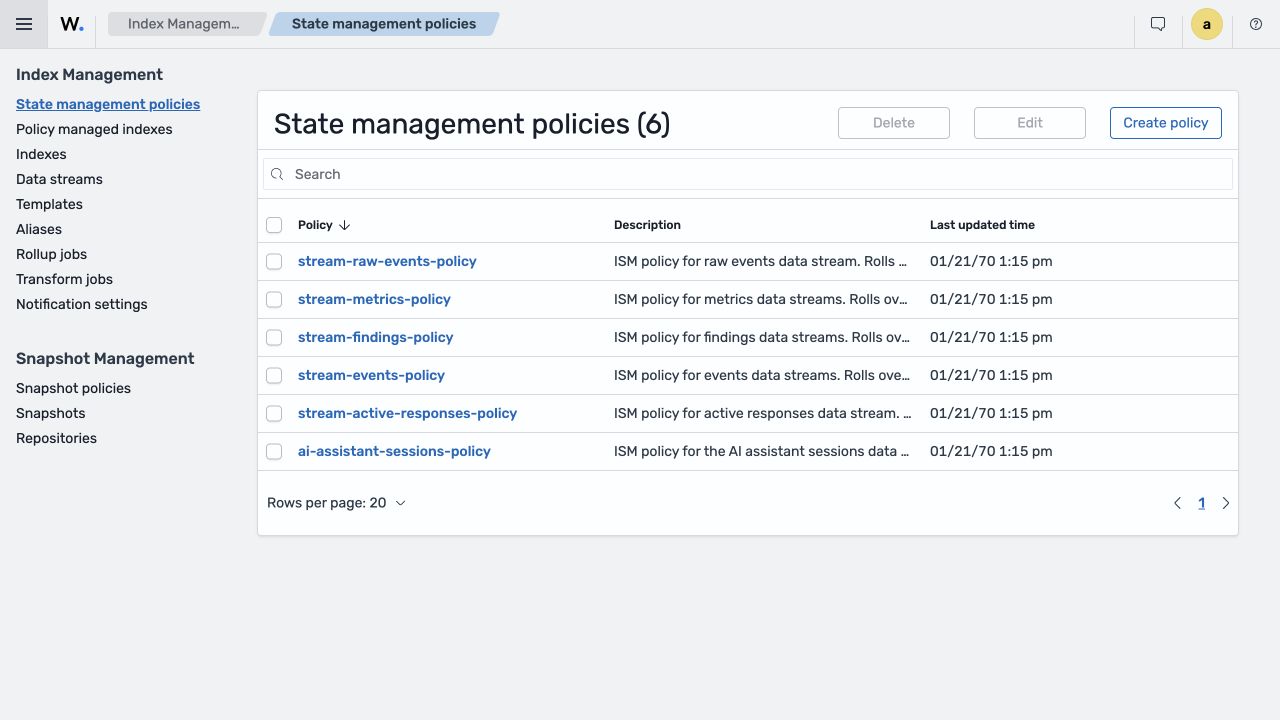
Time-series data uses streams, templates, and Index State Management policies. The setup plugin creates these alongside initial roles and settings. ISM manages rollover and deletion. Wazuh plugin templates use the zstd codec to trade some processing overhead for storage efficiency.
Categories make differentiated retention and access control possible. Broad patterns are convenient for exploration, but expensive dashboards should query only the relevant streams.
Retention settings found in the built templates
The Beta 5 indexer-plugin artifacts contain substantially different age conditions:
| Stream | Index-age condition for transition to delete |
|---|---|
Normalized wazuh-events-v5-* |
min_index_age: 1h |
wazuh-events-raw-v5 |
min_index_age: 10m |
wazuh-findings-v5-* |
min_index_age: 90d |
wazuh-active-responses |
min_index_age: 3d |
wazuh-metrics-* |
min_index_age: 30d |
wazuh-ai-assistant-sessions |
min_index_age: 7d |
Their rollover conditions include a 20 GB primary shard or 200 million documents; AI sessions also have a one-day age condition. These are scheduler-evaluated conditions, not precise timers. Actions have three retries with exponential backoff starting at one minute.
These values are not per-event TTLs. ISM finishes the current state’s actions before checking transitions. An index waiting for a volume-based rollover may remain beyond one hour; index age also differs from the age of individual documents. Effective retention depends on rollover, backing-index age, scheduler timing, and successful actions. Check the active policy and ISM Explain, and configure time-based rollover and retention to meet your needs. The short events condition deserves attention, but it does not prove that every log disappears exactly one hour later. OpenSearch’s ISM action and transition model.
The events template contains 2,299 dynamic field templates and the findings template 2,345, while mapping.total_fields.limit is 1,000. This is not a contradiction: dynamic mappings are materialized when fields first appear, rather than every template immediately becoming a mapped field. Monitor actual field counts and prevent uncontrolled field expansion in custom integrations.
The templates also configure one primary shard, auto_expand_replicas: 0-1, zstd, and a two-second refresh interval for events and findings. Treat these as installation defaults, not a production-cluster design. Derive shards, replicas, refresh, and lifecycle policies from EPS, document size, retention, and recovery objectives.
Raw and discarded events
Archiving input and filtering events are not new capabilities. Version 4.x already has archives controlled by logall/logall_json, plus recognition using parent, prematch, regex and rules. Version 5 changes how these concerns fit into the normalization pipeline: separate filters decide whether events proceed before decoding and after enrichment, while policy settings also control events marked as discarded.
An event that fails the pre-filter never reaches the decoders. The post-filter decides whether a decoded and enriched event reaches the outputs. These stages are not simply renamed decoder-parent relationships: parent matching selects how input is recognized, whereas a filter gates progress through the policy.
The earlier initmax-auth-demo integration illustrates the difference. Its decoder turns result=failure into event.outcome: failure. With identical input and one active filter in the relevant stage:
- Pre-filter
$event.outcome == failure: rejects the message before the decoder because that field does not yet exist. This custom policy produces neither a normalized event nor a finding. - Post-filter
$event.outcome == failure: succeeds after decoding. The event is indexed and the scheduled detector creates one finding under the custom rule. - Post-filter
$event.outcome == success: decoding succeeds, but the filter blocks output. This policy produces neither an indexed event nor a finding, even withindex_discarded_events: true.
Raw collection is separate. With engine.index_raw_events active, the input can remain in wazuh-events-raw-v5 even when a pre-filter or post-filter rejects it. This does not make the original message automatically text-searchable: the default Beta 5 raw-stream template stores event.original in the document with index: false and doc_values: false. First locate records by time, agent or event ID, then inspect their original contents.
index_discarded_events does not recover every dropped log. Setting it to false stops an event marked wazuh.space.event_discarded: true after decoding; true allows it to continue. It bypasses neither the pre-filter nor the post-filter and does not guarantee acceptance by the indexer. Both the normalization pipeline order and the validity of the resulting document matter.
Beta 5 caveat: discard_events() does more than set a flag. With index_discarded_events: true, the helper clears the document’s existing fields before setting the discarded marker. Calling it at the end of normalization in this decoder removes @timestamp and the original log. Subsequent integration metadata mapping does not restore the timestamp, so the indexer rejects the document because its required timestamp is missing. Enabling the option alone therefore does not establish a discarded-event archive; separate raw collection preserves the original input.
Log Test does not confirm indexing or finding creation. In Beta 5 it can report a rule match even when the trace shows a failed post-filter or a blocked discarded event. The test service evaluates normalized output separately; during continuous collection, the rejected document never reaches the detector. Inspect the complete trace and, after policy activation, verify the actual indexed event and finding as well.
Estimate EPS, average event size, retention and shard impact before enabling raw collection or discarded-event indexing. Diagnostic collection without bounded retention can quickly become a disk-capacity problem.
Need help with capacity and retention? Contact us to build a Wazuh 5.0 design from your actual event volumes and investigation requirements.
Sigma-compatible rules replace XML detection rules
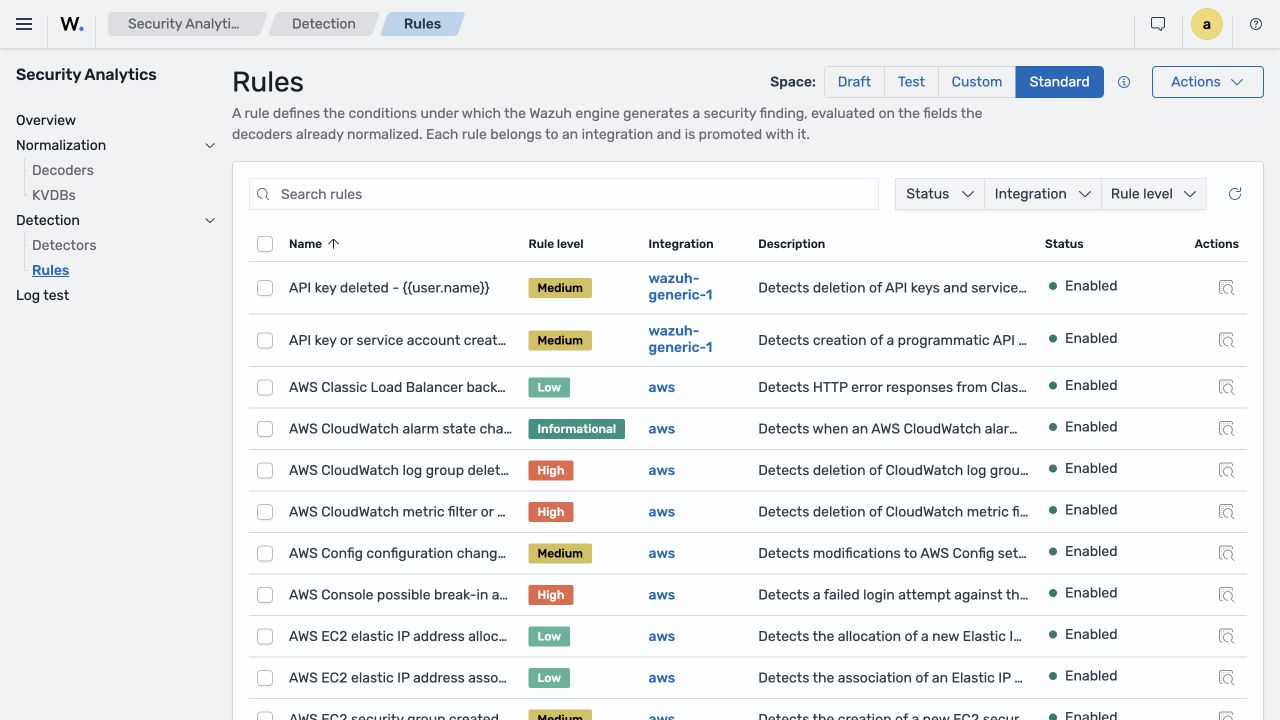
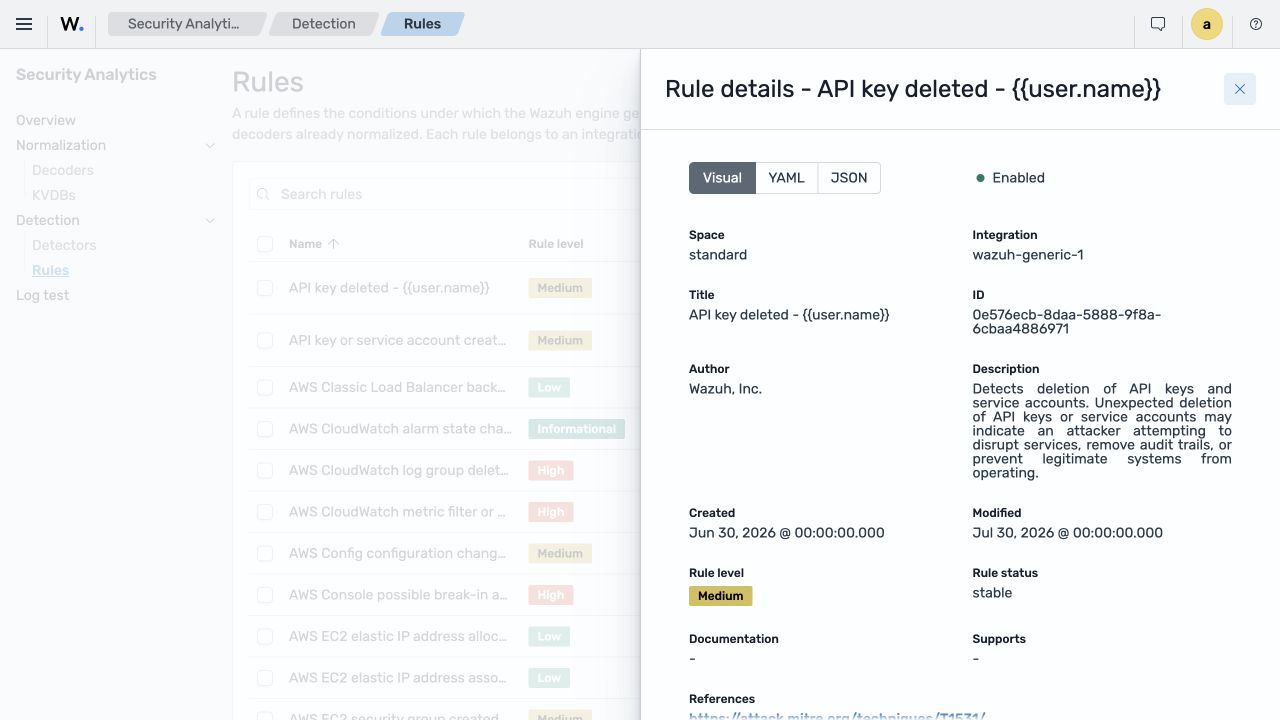
Rules use Sigma-compatible YAML with detection, logsource, Wazuh metadata, severity, and optional MITRE ATT&CK and compliance mappings. Wazuh extensions include substitution of event fields into a finding’s title.
A rule must match the decoder's actual output. This is a shortened excerpt of the standard failed-authentication rule; the full definition also includes compliance and MITRE mappings:
id: 42532ad3-3951-57ee-a3a3-bc6a1b9e6e72
status: stable
level: low
logsource:
  product: wazuh-generic-1
  service: authentication
metadata:
  title: "Failed authentication attempt - {{user.name}} from {{source.ip}}"
detection:
  selection:
    event.action: authentication-failure
    event.category: authentication
    event.kind: event
  condition: selection
This is a single-event match, not proof of a brute-force attack. Frequency, time windows, and correlation by address or account require separate evaluation. A mistyped password alone is not a critical incident, which is consistent with this rule’s low severity.
Referenced fields must be valid WCS fields. The engine validates field references and can return a structured error instead of accepting a rule that can never match because of a typo. Supported modifiers include contains, startswith, endswith, cidr, exists, lt, lte, gt, gte, and list handling. logsource organizes content; detection defines the match.
Severity is no longer a number
The five named severity levels are easier to read but break numeric thresholds in existing automation. Do not mechanically label every old level from 10 to 12 as high. Consider the rule’s purpose, detection confidence, available context, and resulting action. Use the same mapping in dashboards, notifications, SLAs, and ticketing integrations.
initMAX perspective: our experience with Zabbix makes us skeptical of using named levels as the internal severity representation. For calculations, comparisons and downstream automation, we prefer a numeric value with a readable label in the frontend. We suspect Wazuh may eventually return to a numeric representation; this is only our opinion and prediction, not an announced Wazuh plan. Integrations must follow the named levels used today.
Detectors separate rules from data sources
A rule describes what to find. A detector selects the target index or alias, rules, and execution schedule. Standard detectors are supplied; custom detectors can target selected streams and rule sets.
Detection is scheduled and near-real-time, not a synchronous match at log ingestion. Latency depends on the interval, indexing delay, rule count, data volume, and indexer load.
A detector uses Standard or Custom content; it cannot mix both spaces. Configurable limits govern rules per detector and user-created detectors. Group large rule libraries by source and category, and measure execution time.
Findings replace alerts
A finding includes the source document and rule metadata under wazuh.rule, such as ID, title, level, status, MITRE, and compliance. Enriched findings go to wazuh-findings-v5-{category}.
There are two stages: Security Analytics records a match, then asynchronously enriches it with the event and rule. Troubleshooting an incomplete finding therefore requires checking both the detector and the enrichment/bulk-indexing stage.
CTI, GeoIP, and IOC enrichment
Wazuh CTI has supplied vulnerability content since the Vulnerability Detection redesign in Wazuh 4.8; it is not a newly connected vulnerability catalogue. In 5.0, its role expands to distributing standard detection content and IOCs through the indexer’s Content Manager. The operational change is the update path and the range of content synchronized into the analytical pipeline.
GeoIP enrichment can add location, time zone, and ASN information to source or destination addresses. IOC enrichment compares supported addresses, domains, URLs, and hashes against threat feeds and adds context under wazuh.threat.
Not every address has such context. The SSH test uses documentation IP ranges, so an address appearing in a finding is not evidence of a real GeoIP result or IOC match.
IOC enrichment adds evidence, not a final verdict. Rules can combine reputation with behavior, asset, user, and other context. Analysts should inspect the provider, first/last observation, and field that matched.
Vulnerability Detection and the indexer
Agents continue collecting operating-system, package and hotfix inventories and communicating with the manager. Agents did not need direct CTI access for Vulnerability Detection in 4.x either. The 5.0 change is on the central side: the indexer manages CTI vulnerability content used by the manager workflow. Synchronization distinguishes initial scans, inventory changes and feed updates; endpoint internet access is not a new requirement.
A specific change from 4.14.7 is CVSS 4.0 score processing: the earlier scanner selected CVSS 3.1, 3.0 or 2.0, while the 5.0 implementation prioritizes an available 4.0 metric. The CVE 5 data model already existed in 4.x; version 5 adds fields rather than introducing the format from scratch. Check the score version, package association and state changes after inventory updates in custom exports; vulnerability counts alone do not capture the difference.
Active Response moves into the dashboard
Running responses on agents already existed in 4.x. What changes is orchestration: instead of manager <command> and <active-response> blocks, define the response in Explore → Active Responses and attach it to a trigger in an Alerting monitor of type Active Response. The monitor writes a request to the indexer, the manager creates an agent task, and wazuh-execd runs the local executable on the target endpoint. Neither the dashboard nor the indexer executes it on the agent’s behalf.
The response definition includes a name, description, executable, arguments, target (Local, Defined agent or All), and stateless or stateful behavior with a timeout. The triggering condition is configured separately in Alerting. A stateful script must implement both the initial action and its reversal.
Creating a response in the dashboard does not deploy its script. The executable must already exist in the target agent’s Active Response directory. Your automation or package management still handles installation, permissions and dependencies; copying legacy XML blocks into the 5.x manager is not the deployment mechanism. Custom scripts must also understand the new JSON contract, including wazuh.active_response metadata and the corresponding event fields.
Custom scripts using the 4.x JSON contract need updating. In 5.0 Beta 5, stdin carries JSON with enable to apply the response and disable to reverse it, replacing add and delete. Read WCS fields such as source.ip, not the old parameters.alert.data.srcip. Optional arguments arrive in wazuh.active_response.extra_arguments, not as command-line arguments. See the Active Response migration contract.
The All target remains hazardous: a broad condition or faulty script can affect every agent. First validate the detection with a notification-only monitor and no active response attached, then test the response against one designated agent. Stateful scripts must handle enable and disable correctly; a timeout cannot undo an arbitrary change by itself. Also test repeated matches during an active response.
Stateful scripts also depend on the check_keys protocol: the agent replies with continue or abort. Without a keys message, wazuh-execd does not register the response for timed reversal. A repeated matching key suppresses another execution and restarts the timeout, so do not calculate reversal from the first finding alone. This behavior is managed by the local agent daemon.
The operational path is dashboard definition → Alerting trigger → indexer request → manager Task Manager → agent HTTPS control channel → local wazuh-execd. Every stage must work. A normal email or webhook Notifications channel is not required: Add active response is a separate trigger action from Add notification. See the Active Response monitor workflow.
A task marked delivered does not prove that the response succeeded. It confirms delivery to the agent; the script can still fail. Verify its log, the actual endpoint effect, and, for a stateful response, the subsequent reversal.
AI Assistant in the Wazuh dashboard
Wazuh AI Assistant adds a conversational interface over data also accessible through dashboards and searches. Finding a disconnected agent or a vulnerability is not itself a new capability; the difference is natural-language interaction, follow-up context and generated summaries. Check answers against source documents, for example in Discover.
This is not simply a general-purpose chat in an iframe. It uses tools to query Wazuh datasets, handle aggregation and time ranges, and pass queries into Discover. Conversations are stored so investigations can be continued.
The source of truth remains the indexed document, timestamp, index, rule, and original event. A generated explanation helps navigation; it does not establish an incident by itself.
AI is optional; running Wazuh does not require a cloud model. An external provider receives content needed for the response, including the prompt and context retrieved by the assistant’s tools—not an automatic export of the entire indexer. If AI data must remain inside your infrastructure, do not connect the assistant to an external service. A compatible self-hosted model on an internal endpoint is an alternative, subject to validating tool support, operation and outbound connections.
Providers and deployment choices
The Beta 5 form offers two provider types: OpenAI-compatible and Anthropic. Wazuh AI Assistant Brain appears in the development documentation, not as a separate third option in this form. Depending on API and model compatibility, OpenAI-compatible endpoints may include OpenAI services, Gemini, Ollama or LM Studio; tool-calling support is particularly important.
Administrators configure a provider name, endpoint, model, and API key. Keys require encrypted storage. Verify the provider, processing region, training policy, and retention before sending production data.
API compatibility does not imply equal analytical quality. The model must reliably use tools and complete multi-step queries. A local model can help keep sensitive data on your infrastructure, but accuracy and hardware requirements need testing with representative questions.
Privacy mode and field policies
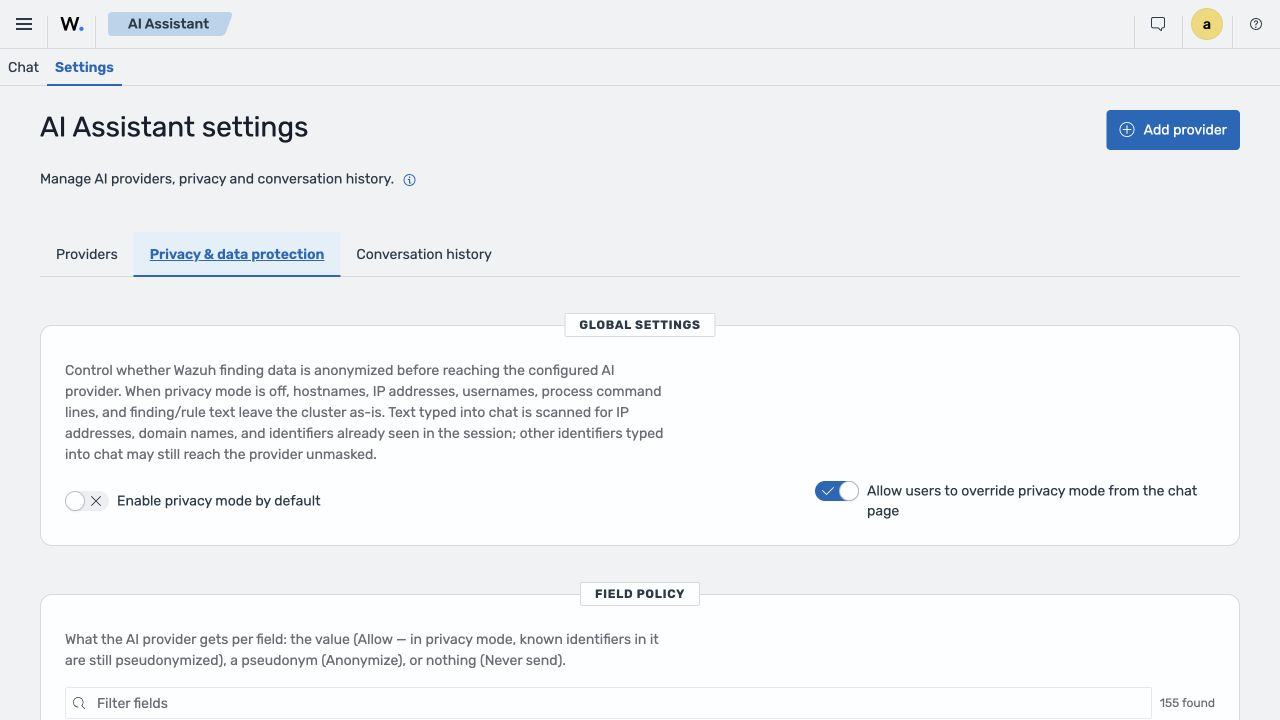
Privacy mode is off by default in Beta 5. Administrators can enable it by default, configure provider-specific defaults, and prevent users from changing it per conversation. When enabled, Anonymize replaces values in tool results with reversible pseudonyms such as HOST_1 or IP_1. This is not irreversible anonymization. Never send serves a different purpose: it excludes the selected field from the outgoing result even with Privacy mode off. It does not automatically erase the same information from every other field or free-text passage. The original indexed data and local result table remain unchanged.
Manually entered information needs particular care. With Privacy mode enabled, the text scanner recognizes IP addresses and fully qualified domain names. A bare hostname such as demo-node07, or a username mentioned for the first time without an existing mapping, can still pass through unchanged. Previously known identifiers can be replaced in subsequent questions. Enabling protection also excludes earlier unprotected tool results and assistant answers from provider-bound history; user questions remain and undergo text scanning. This is not a universal sensitive-data filter. See the field-policy implementation and provider-bound message processing.
Findings may contain usernames, hostnames, addresses, paths, command lines, cloud IDs, email addresses, and the complete event.original. Define the minimum fields needed by each scenario.
Recommended validation includes:
- Start with enforced privacy mode.
- Exclude original logs, secrets, tokens, command lines, and free text unless necessary.
- Pseudonymize endpoint identities, users, and internal addresses.
- Check repeated queries and conversation history.
- Inspect the actual provider-bound payload in a controlled test.
- Check both conversation retention and backing-index ISM. A documented application setting of
0disables its time limit, but Beta 5 also has a seven-day index-age condition for deletion after rollover. Both layers affect effective retention.
What the assistant should not decide for you
Do not let an unverified generated answer close an incident, alter evidence, or authorize Active Response. An analyst should be able to reproduce the time range, filters, and results in Discover.
Before production use, create an evaluation set covering known answers, empty results, forbidden agents, sensitive fields, prompt injection inside logs, and requests for complete result sets. Assess filter correctness, completeness, RBAC, and handling of untrusted log content—not just writing quality.
Case Management: triage without a separate ticket
Wazuh 5.0 adds case metadata to findings under wazuh.case. Available fields include title and description, states such as active, acknowledged, and completed, severity, priority, TLP classification, tags, comments with author/timestamps, and the last modification identity and time.
The case enriches a finding rather than creating a separate copy of its event. Analysts can document an investigation and change its state from the finding detail. A bulk-update API has a configurable per-operation limit.
Analyst identity and AD integration
User is not an assigned owner. In Beta 5, wazuh.case.user.name records the last analyst to update the case and changes on the next edit. Each comment keeps its own author. The interface allows at most 20 comments; only the original author can edit or delete an individual comment. This is not an immutable audit record. With the required permissions, the separate clear-case action can remove all case metadata, including other authors’ comments; the original finding remains. Configure reading, editing and case-clearing permissions according to the team’s needs. This describes the dashboard case-management path, not a separate task-assignment system.
The dashboard obtains identity from the signed-in user’s account API, not by selecting from a local-user directory. Case Management does not synchronize AD or assign cases to arbitrary colleagues from an identity-management system. For LDAP/AD or SSO sign-in, verify the name returned by the authentication layer and the role mappings for reading and updating findings. A successful login alone does not establish those permissions.
Severity, priority, and sharing are different decisions
Severity describes the security problem; priority determines how urgently the team works on it. A critical finding on an isolated lab machine may have lower operational priority than a high finding on a production identity server. TLP governs information sharing.
Set these values using asset criticality, detection confidence, impact, exploitability, scope, and whether activity is ongoing, rather than copying one label into every field.
Native workflow and existing integrations
Wazuh now provides basic finding tracking and an investigation workflow directly. Recording status, priority, a description or comments no longer requires first opening a ticket elsewhere. Existing Jira, ServiceNow or other integrations can remain part of your processes, but they are not prerequisites for the new Case Management workflow. This is an important advance in managing security events and their investigation within the platform.
Incident Response: verify the outcome
Incident Response brings together triggered responses, including their name, executable, type, target and link to the original finding. The new workflow uses wazuh-active-responses* records. A request record is not automatic confirmation of a successful endpoint change. Active Response logs already existed in 4.x; the change is the orchestration workflow and dashboard view, not the first ability to trace a response.
event → finding → decision/monitor → Active Response → execution resultConfirm the last step on the agent: receipt and dispatch in ossec.log, the result in the executable’s own log, and the actual system effect. Built-in scripts commonly write to active-responses.log; custom scripts may use another destination. For stateful actions, also verify reversal after the timeout. The dashboard does not replace this evidence; the response-monitoring guide makes the same distinction.
Alerting and Notifications
Wazuh 5.0 uses Wazuh variants of the OpenSearch Alerting and Notifications plugins. A monitor queries data and evaluates conditions; a notification channel specifies the delivery destination.
Email, Teams, Slack and webhooks are not themselves new 5.0 capabilities. What changes is their integration: an Alerting monitor evaluates data and connects its action to a Notifications channel, rather than reusing the old email-daemon or Integrator configuration unchanged. Recreate and test the condition, destination and permissions during migration; finding the service name in a menu is not sufficient.
For example, a monitor can query wazuh-events-v5-system-activity every minute, filter event.action: authentication-failure, and notify on a per-source threshold. Counting events avoids multiplying failed attempts when one event produces several findings. Check the normalized action against the decoder actually in use.
Notifications do not directly change endpoint state, but a wrong recipient can expose sensitive information and excessive messages can overwhelm operators. Automatic address blocking or account disabling adds the risk of an outage. Validate conditions, recipients and action scope separately: start with observation, then reviewed notifications, then narrowly scoped response with a tested reversal.
Reporting: PDF and CSV
Automated reporting matters for recurring delivery of results: a report definition selects the source, output format and generation schedule, with delivery options depending on report type and configuration. PDF/CSV export and the OpenSearch Reporting plugin already existed in 4.x. Wazuh 5.0 removes the Wazuh plugin’s own legacy report generator and moves that workflow to its OpenSearch Reporting variant. The change is the reporting layer and its migration, not the first-ever ability to produce a PDF.
A scheduled report is not automatically a PDF attachment. For dashboards and visualizations in Beta 5, the system creates a report record with the selected time range; an email notification can include a link through {{reportLink}}. The visual PDF is then rendered and downloaded in the user’s browser. A record marked Success or Shared therefore does not by itself prove that a PDF file has been stored or successfully delivered. Unattended PDF archiving or delivery as an email attachment requires a separately implemented and verified workflow. See the report-link delivery procedure and the visual report generator.
Keep existing PDFs as a separate archive: the new reporting layer does not import them automatically. Old branding settings do not migrate either. Configure the header and any logo in the individual report definition via Explore → Reporting → Create → Report definition → Add header, not merely in the dashboard’s own branding.
Known Beta 5 bug: the footer is missing from the generated PDF. The Add footer control exists, but the vendor documentation explicitly warns that the output omits it. Do not promise the previous report appearance without inspecting the generated PDF.
Download the example: Active Response PDF report with the initMAX logo (666 kB). This native Wazuh 5.0.0 Beta 5 export contains only demo events and test endpoints, with no customer data. Its header states the time range and time zone; the missing footer reflects the Beta 5 limitation described above.
Validate the accessible data scope, time zone, time range, CSV row limit, and email channel. Check permission to create a definition, run a report, and read the source data when opening its link separately. An administrator's working dashboard does not prove that a recipient sees the same data or that a file will be generated without signing in.
Dashboard, navigation, and health checks
The 5.x dashboard is based on OpenSearch Dashboards 3.x and defaults to the v9 theme generation. The home page combines endpoint, finding, vulnerability, and component-health information. Navigation follows analytical tasks rather than the historic plugin layout.
Visible changes include Security Analytics; AI Assistant in the top bar and Active Response under Explore; Case Management and Incident Response; distinct patterns for events, findings, state data, and metrics; revised API/indexer/plugin/certificate/monitor health checks; Regulatory Compliance; communication and normalization statistics; and permission-controlled indexer configuration.
Compliance in one place
Regulatory Compliance brings PCI DSS, GDPR, HIPAA, NIST 800-53, and TSC into one application. The release notes also list CMMC, FedRAMP, ISO 27001, NIS2, and NIST 800-171 modules.
A compliance dashboard is not certification. It presents findings mapped to requirements. An audit still needs evidence of source coverage, correct rules, retention, access control, and remediation procedures.
Removed applications and renamed workflows
The former Rules, Decoders, CDB List and Ruleset Test applications give way to Security Analytics and Content Manager. The Wazuh application’s legacy report generator is removed, not the ability to use OpenSearch Reporting. Older Statistics, Cluster and App Settings views change, and the earlier CIS-CAT and Osquery dashboard modules disappear. A removed view does not by itself prove that every way to collect that data has been removed.
A missing menu item does not necessarily mean the whole capability is gone. Map each workflow used by your team to its new equivalent before migrating roles and internal runbooks.
Agents: local state and a new synchronization model
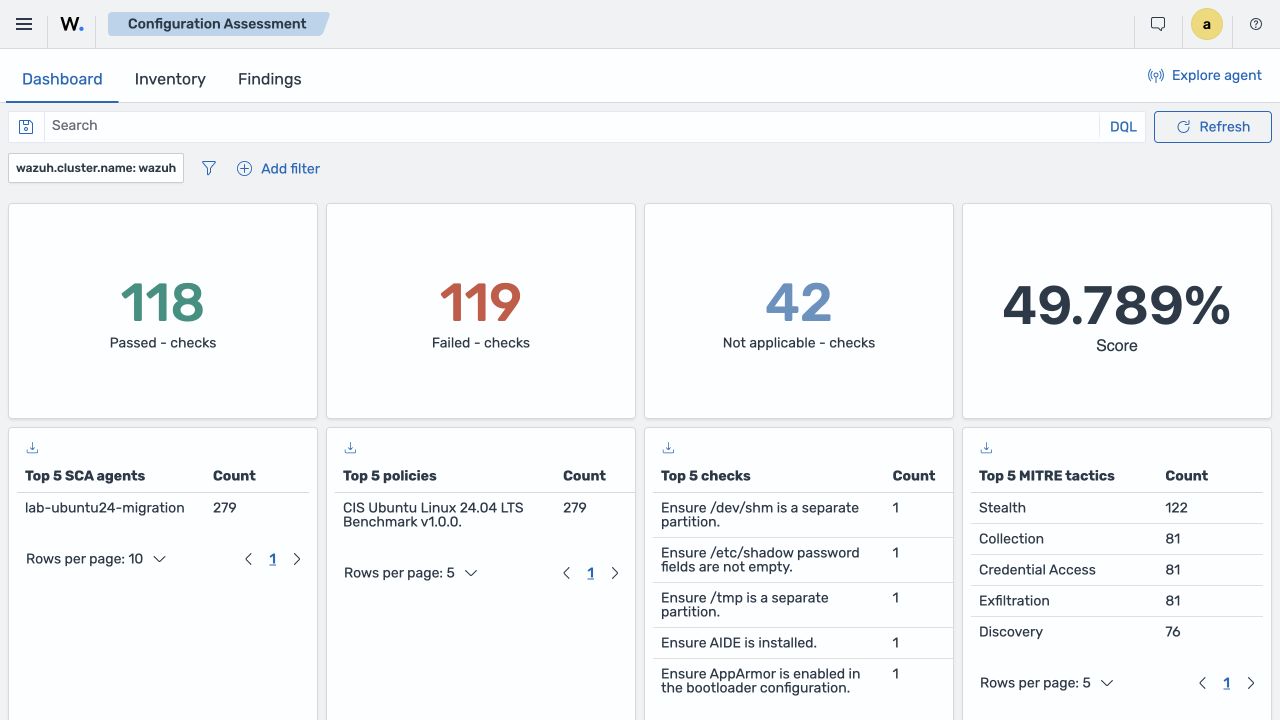
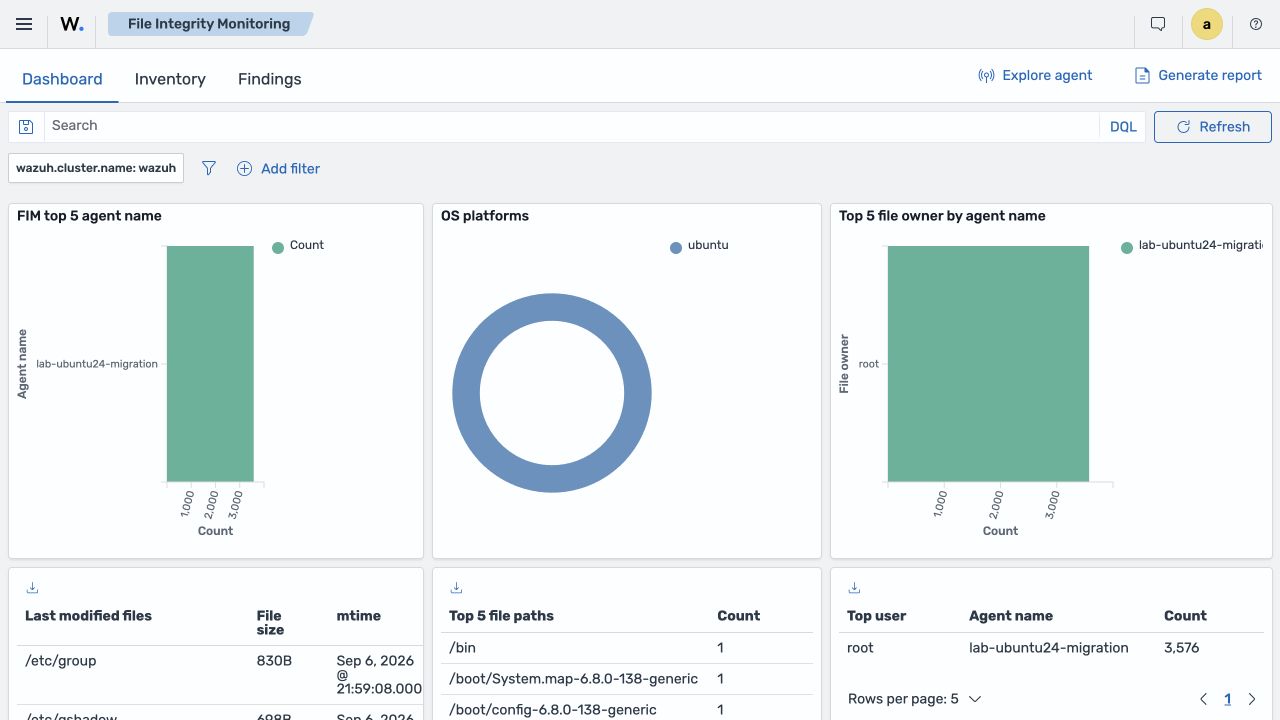
Wazuh 5.0 removes the state modules’ dependency on the internal RSync library and changes how agents retain their working state. Local databases already existed in 4.x; the change is the redesigned persistence and synchronization model. FIM, Security Configuration Assessment and System Inventory retain working state across agent restarts. This is an internal Wazuh library dependency, often invisible to administrators, not the Linux rsync utility.
The practical benefit is a persistent baseline for comparing changes, not merely a central copy of state. Agents send state and changes through the manager into state indices; the new protocol handles document versions and consistency recovery. Persistence does not guarantee that a restart never triggers a scan or full synchronization. FIM has a specific migration change: in Beta 5 it scans on every agent startup, and scan_on_start inside syscheck is no longer valid. Remove it from the old configuration; do not automatically apply this restriction to SCA or Syscollector, which have their own settings. See the agent configuration migration changes. See the state-persistence design and new synchronization model. Network and load impact depends on the actual inventory and frequency of changes.
The default FIM synchronization limit, <synchronization><max_eps>, increases from 10 messages/s in 4.14.7 to 75 in Beta 5. The separate regular FIM event limit, <max_eps>, remains 50: a higher synchronization limit is not a promise of higher total deployment capacity. Other changes include initial reads after log rotation, WCS-aligned JSON for agent-start/buffer-status events and simplified rootcheck.
Windows Event Channel in Beta 5 sends native XML from EvtRender(), whereas 4.14.7 constructs JSON; the normalized indexed document remains JSON. Revalidate custom Event Viewer decoders and rules against the new input and normalized fields. MSI and ARM64 WPK packages already existed in 4.x.
Distribution support is not a single capability
AlmaLinux is not a newly supported platform in 5.0: Vulnerability Detector support arrived in 4.6. The 4.13 release notes already include AlmaLinux and Rocky Linux recognition in the upgrade module. Specifically, this automatically selects the RPM package type during remote upgrades; it does not introduce the first ability to run an agent on these systems.
For the move to 5.0, distinguish installation-package availability, remote upgrades, SCA policies and vulnerability coverage. One does not prove the others. The Beta 5 compatibility matrix helps check a specific OS and architecture; an entry in the installation selector does not demonstrate that every one of these paths works.
HTTPS communication and compression
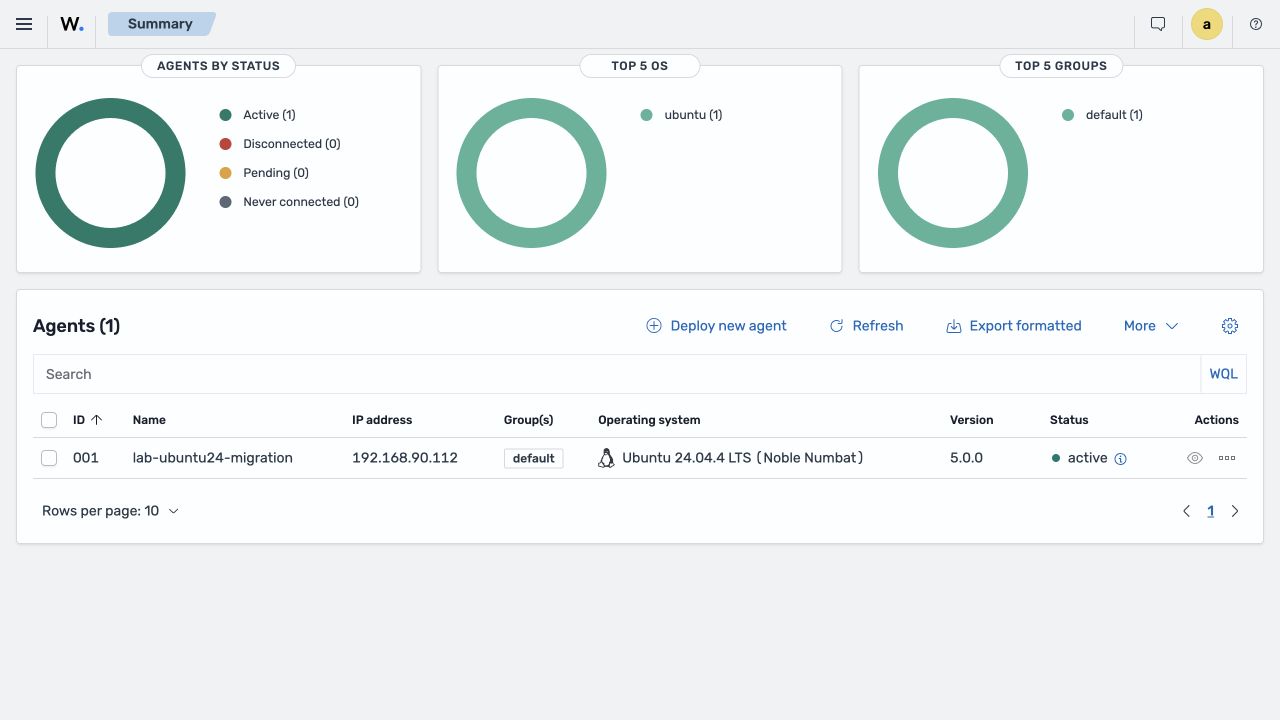
Wazuh 5.0 introduces an HTTPS agent-manager path and enrollment endpoint, along with default zstd compression on the agent. Verify the final protocol defaults and supported migration paths when the release becomes final.
Certificate checks and firewalls are not new features. The change is the transport: 5.x agents use the manager’s HTTPS listener, normally TCP 1517, while the retained 1514 channel serves legacy 4.x agents. Successful old enrollment does not prove that an upgraded agent can reach the new endpoint. Only if your deployment actually includes an external reverse proxy or load balancer should you also validate its routing and peer identity handling. Wazuh does not require or provide that proxy as part of this feature.
HTTPS does not automatically mean verified peer identity. In v5.0.0-beta5, an agent without an <agent><ssl> block defaults to AGENT_VERIFY_NONE. The full mode validates both the certificate chain and hostname, requiring a suitable trust anchor and server certificate. The system mode uses the operating system’s trust store. This is explicit in the agent initialization code.
The manager requires a server certificate; installation generates a self-signed pair if none exists. This does not distribute trust to agents. Verification of client certificates is separately controlled by <remote><https><verification_mode>: its reference default is none, automatically raised to certificate when a CA is explicitly set without a mode. Client certificates are therefore not an unconditional requirement in every installation.
Migration impact: provision the server configuration and agent trust before cutover. If mutual TLS is required, also provision client certificates and keys. Preserving an ID, supplying an enrollment password or replacing a package remotely does not perform this work; disabling verification is not a recommended substitute.
Enrollment uses a shared password
The supplied manager configuration sets <auth><use_password>yes</use_password></auth>, so agents must provide the enrollment password in the default installation. If the option is omitted, the parser fallback is no: installer defaults and an incomplete custom configuration are not equivalent. Password protection itself already existed in 4.x.
The remaining weakness is plaintext storage in /var/wazuh-manager/etc/authd.pass, not the manager keystore. In this deployment mode the agent reads /var/ossec/etc/authd.pass. File permissions restrict access but do not encrypt the contents. Anyone able to read the file obtains the shared enrollment secret. Protect its backups and distribution too; a keystore would not replace access control.
The master owns the password and distributes it to workers. When password protection is enabled, an unavailable or invalid secret must not make HTTPS enrollment fall back to open access. A password is not mandatory in every possible configuration: HTTPS also supports client-certificate authentication. The certificate and password checks are independent; disabling both leaves enrollment unprotected. This article does not recommend disabling either protection.
A single manager is still a cluster node
We welcome this change: initMAX has long used the cluster model even for single-manager deployments. Version 5 makes the operating model consistent across one or multiple nodes. A one-node cluster does not, by itself, provide high availability.
Every 5.0 manager operates as a cluster node. The former standalone-versus-cluster distinction and cluster.disabled option are removed. A one-node installation is still a cluster from the API’s perspective.
This unifies code paths but changes permissions and automation. Older /manager/... calls may move to /cluster/{node_id}/... equivalents. Installation generates a random cluster key; multi-node deployments require unique node names and secure key distribution.
Security defaults and least privilege
RBAC, certificates and secured enrollment are not new to version 5. The changes concern defaults and permissions for the new components: plugin roles and API mappings; randomized cluster keys; enrollment passwords enabled in the supplied configuration; revised dashboard-to-manager certificate settings; and changes to older administrative tools. For manager-to-indexer communication, Beta 5 defines the wazuh-manager service account with the wazuh_manager role and permissions for the new streams and state indices. Routine ingestion should not use an administrator account. See the account and role reference.
Export the active security configuration before migration. Files on disk may be stale because effective settings live in the indexer’s security index. Review users, roles, role mappings, and authentication domains before creating the 5.x equivalents.
indexer-security-init.sh can upload local security files and overwrite changes made through the UI or API. Treat it as a controlled change requiring a backup and configuration comparison.
Removed components and compatibility
Removal must be distinguished from renaming and changes in responsibility. The 5.0 manager no longer installs the former wazuh-agentlessd and wazuh-maild. Authentication and database services still exist as wazuh-manager-authd and wazuh-manager-db in Beta 5. Nor is manage_agents removed everywhere: the agent installation branch still includes it, while the manager uses revised tools and APIs. The separate agent-auth executable is no longer installed through this path. See the manager and agent installation code.
Sometimes the capability has a replacement: new enrollment services, Notifications, and Content Manager cover parts of the old functionality. Other uses, such as agentless monitoring tied to an old daemon, may need redesign.
Inventory all dependencies on /var/ossec, API endpoints, CLI calls in Ansible/runbooks, custom rules/decoders/lists/integrations, Filebeat or Logstash, wazuh-maild, Active Response, dashboards/reports/patterns, identity providers, and consumers of alerts.json or old indices. This inventory determines the actual project scope.
This is an inventory of dependencies, not a deletion list. Preserve old indices and snapshots during the transition. Historical documents are not automatically converted into WCS events and findings; verify historical access, retention and rollback separately from the new ingestion path.
Book a technical assessment of your 4.x environment, compatibility gaps, pilot, and rollback plan. We are preparing dedicated migration guidance and a migration webinar alongside our regular Wazuh sessions.
Platform requirements and sizing
Do not transfer capacity tables mechanically from 4.x to 5.x. Events and findings are stored separately; source types, audit settings, raw/discarded streams, replicas, shards, compression, state indices, CTI, snapshots, and recovery headroom all affect capacity. A representative pilot is more useful than agent count alone.
Measure average/peak EPS by source, daily primary-data growth, event-to-finding ratio, state/CTI size, detector execution time, heap/CPU/queue pressure, indexing latency, retention, and restore time. Use those results to choose all-in-one, a separate indexer, or distributed clusters.
Migration: a new system beside the old one
Keep the 4.x deployment available, create a new 5.x deployment, and migrate or recreate only supported components. Central components cannot be upgraded in place because OpenSearch 3.x, WCS, data streams, Content Manager, detection, and configuration change together.
4.x inventory → backups → new 5.x lab → content conversion → parallel validation
→ preserve 4.x history → agent registrations/groups → pilot agents
→ compare events/findings → cutover → retain 4.x archive until retention expires
What moves, and what is recreated?
| Area | Migration approach |
|---|---|
| Historical indexed data | No supported migration into 5.x. Retain the original 4.x environment in read-only mode for historical searches. |
| Indexer configuration | Recreate compatible settings; do not copy old configuration wholesale. |
| Users, roles, authentication | Export the active state and build a compatible 5.x configuration. |
| Manager configuration | Use 4.x as a reference and recreate supported sections. |
| XML rules, decoders, lists | Convert to the Content Manager/Security Analytics model. |
| Dashboard configuration | Recreate in opensearch_dashboards.yml and Advanced Settings. |
| Custom dashboards/searches | Export/import saved objects, then repair patterns and field references. |
| Agent registrations | Import client.keys through the 5.x API, preserving IDs and keys. |
| Agent groups | Transfer reviewed etc/shared/<group>/agent.conf files into the new manager directory. Do not copy generated merged.mg; restore agent membership separately through API/UI. |
Group configuration and membership are separate
Shared group configuration remains file-based in the Wazuh 5.0 manager: /var/wazuh-manager/etc/shared/<group>/agent.conf, using XML rooted at <agent_config>. A Linux agent has a separate local file, /var/ossec/etc/ossec.conf, rooted at <ossec_config>. These names are not interchangeable.
The running manager API creates the group directory and agent.conf, while membership changes go through Wazuh DB. Indexed configuration visibility does not make an index restore a group migration. Back up both group definitions and the agent-to-group mapping, transfer compatible settings and restore membership against the imported agent IDs. Regenerate merged.mg; copying a group directory alone does not preserve membership.
Keep historical data separate
The new Wazuh 5.x system will not contain your 4.x history: the supported migration procedure does not transfer it, and new data collection starts from zero. Historical data remains accessible through the retained 4.x indexer and dashboard. The official Beta 5 migration procedure covers manual transfer of compatible configuration, not historical indexed data. The vendor does not support in-place upgrade, snapshot/restore, or reindex of 4.x data into 5.x. See the indexer migration limitations.
If historical alerts are required, retain the original 4.x indexer and dashboard as a separate read-only environment. Once collection has moved to 5.x, stop ingesting new data into 4.x and, as appropriate for the deployment, mark the historical indices read-only. Verify access, permissions, and searches over a time range containing historical records.
New events and findings after cutover belong in 5.x; earlier history remains in 4.x. A unified view across both generations is not provided by this migration procedure. Custom export or transformation would be a separate integration project, not a supported conversion of old alerts into new findings.
Do not delete old indices, backups, or the required 4.x environment when switching the agents. Plan retirement according to retention and audit requirements. Successfully restoring one index in a particular technical combination does not establish supported migration or historical-data compatibility with the Wazuh 5.x applications.
New manager paths and configuration
We welcome the consistent manager naming: its main file is now /var/wazuh-manager/etc/wazuh-manager.conf. It is still XML, not YAML. The root changes from <ossec_config> to <wazuh_config>. YAML decoders are separate detection content, not this file’s new format.
Example of the new manager syntax:
<wazuh_config>
  <global>
    <agents_disconnection_time>15m</agents_disconnection_time>
    <agents_disconnection_alert_time>0</agents_disconnection_alert_time>
  </global>
  <remote>
    <https>
      <port>1517</port>
    </https>
  </remote>
</wazuh_config>
This is an excerpt, not a complete installation configuration. Adapt supported settings within the generated file, retaining the correct cluster settings, certificates and indexer connection. A 1514 listener for older agents belongs under <remote><legacy>, not the old flat options directly under <remote>.
Manager runtime overrides belong in /var/wazuh-manager/etc/wazuh-manager-internal-options.conf, using module.option=value. For example, this controls the enrollment-password change polling interval in seconds:
remoted.enroll_password_refresh_interval=10The REST API retains its own YAML file, /var/wazuh-manager/api/configuration/api.yaml; the dashboard uses /etc/wazuh-dashboard/opensearch_dashboards.yml. Not all configuration has moved into one file. Automation must distinguish the owning service, target file and syntax.
Install the dashboard fresh
The 4.x configuration path /usr/share/wazuh-dashboard/data/wazuh/config/wazuh.yml is replaced by /etc/wazuh-dashboard/opensearch_dashboards.yml. hosts becomes wazuh_core.hosts, health checks use healthcheck.checks_enabled, and older cron/monitoring options disappear. Global Advanced Settings overrides use uiSettings.overrides.
Import custom saved objects selectively, not the vendor's entire 4.x dashboard set. Repair old patterns and field references and inspect every panel over a range containing data.
A dashboard index pattern is a saved data selection, such as wazuh-alerts-*; it is not the Filebeat index template that defines mappings. Migration does not require inventing new index naming conventions. Keep historical panels in the retained 4.x environment. Visualizations imported into 5.x must target its new streams, such as wazuh-findings-v5*. Importing a saved object does not transfer its underlying data. Updating field references and selecting the data source are separate steps.
Custom detection content is its own workstream
For each integration, retain source-file checksums, representative and problematic logs, a field map, new YAML in Draft, positive/negative Log Tests, a same-input comparison of 4.x alerts and 5.x findings, downstream notification/dashboard/response dependencies, and an approved promotion to Custom. Syntax-only conversion can silently change detection coverage.
Plan custom XML rules and decoders as a manual content-conversion project. The vendor migration guide explicitly requires manually rewriting rules and documents per-construct decoder mappings. Serializing XML as YAML is insufficient: normalized fields, dependencies and correlation semantics change.
Where to find Draft: open Security Analytics → Overview and select Space: Draft at the top. This is where custom integrations, decoders, rules and KVDBs are authored; Draft content is not active in production. Promotion to Test makes it available for engine validation, followed by promotion to Custom for production custom content. Standard holds vendor content, not another approval stage.
Preserve agent identity
Import active registration rows from client.keys through the 5.x manager API before switching addresses. Preserve the ID, name, IP restriction, and key; then change the agent’s manager address and restart it.
A 4.x agent can communicate with a 5.x manager during transition, but FIM, SCA, inventory, Active Response, and Vulnerability Detection are not fully supported until the agent reaches 5.x. Treat mixed versions as a short pilot stage, not the target architecture.
Updating an agent package is not the same as completing migration. Handle identity preservation, compatibility of the specific package type and the HTTPS transition separately. Support for DEB, RPM, MSI, PKG and remote WPK procedures is not interchangeable. Central components require a new parallel deployment.
Preserving identity does not provision the new connection. Importing client.keys retains identity and the shared key, but does not configure trust in the server certificate or deploy a client certificate where the manager requires one. authd.pass concerns enrollment; correctly imported agent identities do not automatically require re-enrollment.
If the endpoint lacks the required TLS configuration and trust, it needs a separate preparation step before cutover, manually or through your configuration-management tooling. A remote package upgrade alone does not replace that work. Disabling certificate verification or bypassing security checks is not a recommended migration procedure.
Validate before cutover
- Expected component builds and healthy clusters.
- Normalized data arriving in every required category.
- Loaded Standard/Custom policies and consistent content versions.
- Expected WCS and finding results from representative replay logs.
- Explained differences in event/finding counts.
- Full FIM, SCA, inventory, and vulnerability synchronization after agent upgrades.
- Working custom dashboards with correct fields and patterns.
- Delivered notifications without sensitive-data leakage.
- Tested response execution, reversal, and emergency disabling.
- Verified AI RBAC/privacy and links to source evidence if AI is enabled.
- Verified backups and recovery in a compatible environment, plus working historical access in 4.x; this does not imply a supported restore of 4.x indices into 5.x.
- A defined rollback window with 4.x still available.
How to prepare now
4.x support after the 5.0 release
Technical support is not a promise of continued fixes for every older version. The vendor’s currently linked paid-support terms cover N and N−1; patches for N−1 are not guaranteed, and a fix may require updating to the current version. This does not establish guaranteed fixes for the entire 4.x series after 5.0.
We do not give a 4.x end-of-support date without vendor confirmation. For migration planning, confirm the exact version, support period and availability of security fixes under your contract. An old package remaining available does not guarantee maintenance.
What to prepare before migration
Until the final release, keep Wazuh 5.0 in an isolated lab. Plan production migration, but wait for the final release, its support matrix, and successful environment-specific testing.
Prepare a supported 4.14.x source environment, inventory custom content and automation, collect anonymized replay samples, and export custom dashboards with their referenced saved objects. Check references to wazuh-alerts-* and the fields each panel uses: historical panels remain in 4.x, while panels imported into 5.x must use the corresponding new data. Measure EPS and retention, check OS support, prepare PKI and enrollment-secret handling, and convert one integration end to end in a parallel lab. If using AI, apply the processing restrictions described in the AI section.
Want to see the changes in practice? Alongside regular Wazuh webinars, we are preparing a Wazuh 5.0 demonstration and a dedicated upgrade/migration session, including the difficult parts of moving an existing 4.x deployment. See our webinar schedule.
Summary
Wazuh 5.0 standardizes data with WCS, separates normalization from detection, and moves content management, rules, reporting, notifications, and responses closer to the indexer. Draft → Test → Custom gives custom detection content a managed lifecycle. Sigma rules and enrichment improve portability and context, while Case Management, Incident Response, and AI Assistant broaden the analyst workflow.
The trade-off is substantial incompatibility with 4.x. The Beta 5 migration procedure requires a fresh installation and manual transfer of compatible configuration; historical data is not migrated, and data collection in the new system starts from zero. Retain the original 4.x environment as a separate archive for the required retention period. Plan parallel testing, conversion of custom detection content, and controlled agent cutover—not just package updates. Base production decisions on release notes and your own test results.
Downloads and further reading
- Wazuh 5.0.0 Beta 5 test release.
- Official 5.0 release-notes source.
- New data-analysis documentation.
- Official 4.x-to-5.x migration guide.
- Indexer-plugin release notes.
- Audited manager/Engine source tag.
- Audited indexer-plugin source tag.
- Introducing Wazuh CTI.
As specialists in Wazuh, SIEM, infrastructure, and automation, we can help assess readiness, design the architecture, convert custom content, build a pilot, and manage migration. Contact initMAX to discuss your current environment and the path to Wazuh 5.0.

Give us a Like, share us, or follow us 😍
So you don’t miss anything: